
Overview
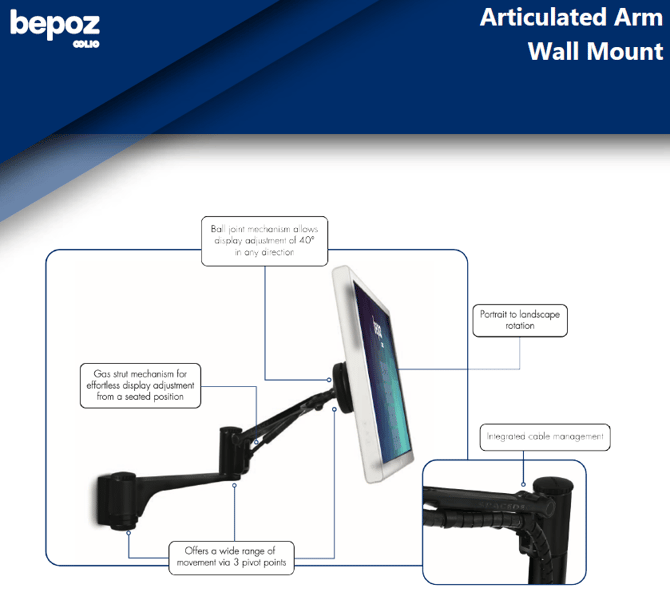
An articulated arm wall mount allows a POS display to be securely mounted to a wall while still providing adjustable positioning for staff and customers. This guide outlines typical installation requirements, safe adjustment, and key specifications to consider when selecting and installing an articulated arm for a POS environment.
Use cases
-
Wall-mounting a customer-facing display where counter space is limited.
-
Positioning a POS display for seated operation or accessible viewing angles.
-
Providing portrait or landscape rotation (where supported by the mount and display).
Requirements
Hardware and tools
Articulated arm wall mount with a compatible VESA mounting plate.
Fixings suitable for the wall type (timber stud, masonry, or reinforced panel).
Drill, suitable drill bits, level, and measuring tape.
Socket set or screwdriver set (as required by the mount hardware).
Cable management consumables (ties or sleeves) if not integrated.
Important: These arms must be fitted by a qualified tradesperson. bepoz do not install articulated arm wall mounts.
Site requirements
A structurally sound mounting surface capable of supporting the combined weight of the display and arm.
Sufficient clearance for the arm’s full range of motion (including tilt and rotation).
Power and data cabling routes that will not bind or pinch when the arm moves.
Install the articulated arm wall mount
-
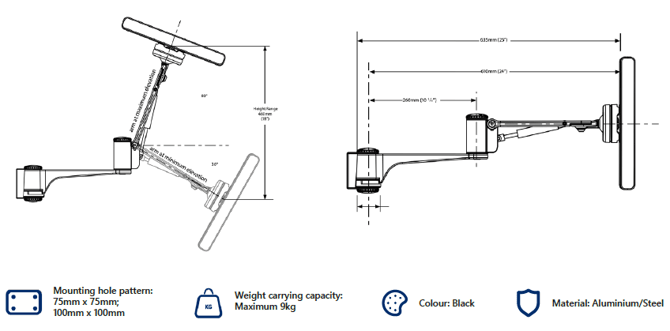
Confirm the display’s VESA mounting pattern matches the mount (commonly 75 × 75 mm or 100 × 100 mm).
-
Measure the intended mounting height and working reach to ensure the display will sit within the required viewing area.
-
Locate structural support (for example, wall studs or a reinforced mounting panel) and mark the mounting points.
-
Level the wall bracket position and mark all drilling points using the bracket as a template.
-
Drill the mounting holes to suit the wall type and fixings.
-
Secure the wall bracket using appropriate fixings and tighten to the manufacturer’s guidance.
-
Attach the arm assembly to the wall bracket (if supplied as separate components).
-
Mount the display to the VESA plate and tighten all fasteners evenly.
-
Test the arm’s movement through the full range to confirm it moves freely without contacting walls, counters, or other equipment.
Caution: Do not mount into plasterboard alone. Always fix to suitable structural support and use fixings rated for the load and wall type.
Adjust and position the display
-
Support the display with one hand before making any adjustment.
-
Adjust the arm extension and pivot points to position the display at the required distance and angle.
-
Tilt the display to reduce glare and improve readability.
-
Rotate the display between portrait and landscape (if supported) and confirm cables have enough slack for rotation.
-
Tighten any tension controls so the display holds position without drifting.
Note: Some articulated arms use a gas strut or tension mechanism. Adjustments may require incremental changes to avoid sudden movement.
Cable management
-
Route power and data cables along the arm using the integrated cable channel (if available).
-
Leave a service loop near the display to allow tilt and rotation without strain.
-
Secure cables at pivot points to prevent pinching when the arm is moved.
-
Confirm the arm can extend, retract, and rotate without pulling on connectors.
Maintenance and safety checks
-
Inspect mounting fasteners periodically and retighten if any loosen over time.
-
Check pivot points for excessive play or sag and adjust tension where available.
-
Replace damaged cables immediately, especially if insulation is worn from repeated movement.
-
Clean the arm and bracket using a dry or lightly damp cloth and avoid solvents that may damage finishes.
Typical specifications to confirm before purchase or install
-
VESA compatibility: 75 × 75 mm and/or 100 × 100 mm.
-
Maximum load rating: ensure the mount is rated above the display’s weight (allowing a safety margin).
-
Range of motion: extension length, tilt range, and number of pivot points.
-
Rotation support: portrait/landscape capability (if required).
-
Cable management: integrated channel or external management options.
-
Materials and finish: suitability for the environment (high-use retail, back-of-house, etc.).
bepoz v4.8.2.1