Skip to content
  • There are no suggestions because the search field is empty.

📄🎥 About Surveys

This article will provide a overview of the survey feature 

Overview

This article will provide a overview of the survey feature and how it appears on the app

Surveys allow users to acquire customer feedback from app members. They can be used to see the customer's opinions of the venue, business, and app.


Prerequisites 

  • To access the "Survey" setup:
  • Report Role Privileges will need to be enabled
    • Roles "Role Maintenance" Panel
      • Privilege Flags: "Report"
  • Survey will need to be active
    • Feature Control "Side Nav" tab
      • "Show Hidden?" Flag
        • Survey: ON (Blue)
  • To access the configurations for this feature, click Surveys label on the backpanel sidebar
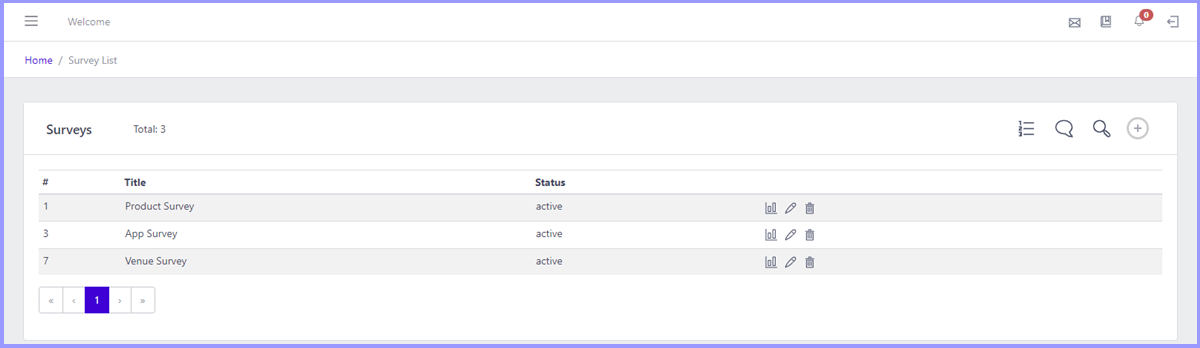
Functionality Description

View Report 

  • When clicked will show various reports on different aspects of the survey 

Edit 

  • Used to modify a survey
  • When clicked, it will open the current configurations for the existing survey

Delete 

  • This icon will remove the survey from the list
  • If the survey has previously been used, a prompt will appear outlining that it cannot be removed as the values may be used in other areas of the system

Show all Question 

  • Shows questions from every existing survey 

Show all Answer 

  • Shows all answers previously created

Search 

  • Users can input characters to find specific surveys

Create 

  • The icon is used to add new surveys to the list
  • Clicking it will open a create survey panel


Video Walkthrough - Surveys Overview