
Overview
The "Account Details" Sub-Function allows Operators to view and edit Account Information directly from SmartPOS.
Prerequisites
- To access Till Function Settings, the applicable Operator Privileges will need to be enabled
- Operator Maintenance 'General' Tab
- System Setup: "Maintain Till Function Maps" Flag
- Operator Maintenance 'General' Tab
- To access and use this Till Function within SmartPOS, the following Operator Privileges will need to be enabled
- Operator Maintenance 'Till Privileges' Tab
- General: "Operate Tills" Flag
- Tables: "Table Sales" Flag
- Tables: "Create New Tables" Flag
- Accounts & Discounts: "Account Till Functions"
- Operator Maintenance 'Till Privileges' Tab
Initial Setup
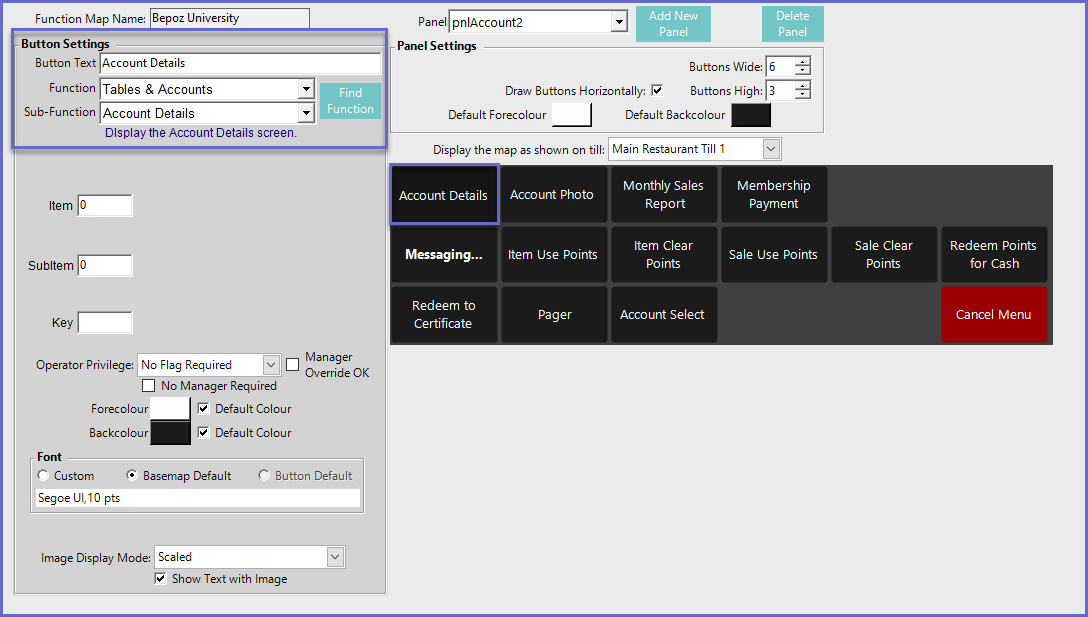
- Click on the desired Button space and then configure the Button Settings:
- In the Button Text field enter the text that will display on the Till Function Button on SmartPOS Workstation screens
- Set the Function drop-down to 'Tables & Accounts'
- Set the Sub-Function to ' Account Details'
Function-Specific Configurations
- There are no function-specific configuration options to be set with this Till Function