
Overview
The "Account Select" Sub-Function is designed for searching and selecting an Account, and then attaching it to the Open Table.
Prerequisites
To access Till Function Settings, the applicable Operator Privileges will need to be enabled- Operator Maintenance 'General' Tab
- System Setup: "Maintain Till Function Maps" Flag
Initial Setup
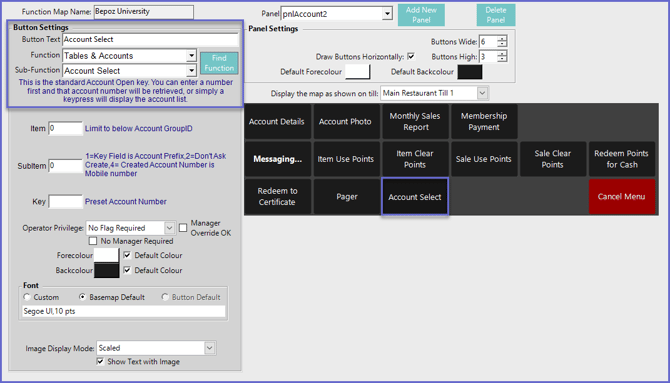
- Click on the desired Button space and then configure the Button Settings:
- In the Button Text field enter the text that will display on the Till Function Button on SmartPOS Workstation screens
- Set the Function drop-down to 'Tables & Accounts'
- Set the Sub-Function to 'Account Select'
Function-Specific Configurations
- The Item field is the Account GroupID which will only display Accounts belonging to that Group
- For more information about Account Groups please visit the Account Maintenance "Main Setups" Tab Article
- Enter a corresponding number into the SubItem field where:
- "1" is the Account Prefix that was entered in the Key Field
- "2" will select and open the Account with the associated number entered in the Key Field
- Accounts cannot be searched if this configuration is selected
- "4" will assign the Key Field Number to also become the Mobile Number when an Account is created