
Overview
The "Account/Table Resell Last Sale" sub-function allows the Operator to recall the most recent transaction of either the current Account or the current Table.
If applicable, the Products will be Repriced according to any changes in the Pricing structures.
Prerequisites
- To access Till Function Settings, the following Operator Privileges will need to be enabled:
- System Setup: "Maintain Till Function Maps" Flags
- Operator Maintenance 'General' Tab
Initial Set-up
- Click on the desired Button space and configure the Button Settings:
- In the Button Text field enter the text that will display on the Till Function Button on SmartPOS Workstation Screens
- Set the Function drop-down to 'Tables & Accounts'
- Set the Sub-Function to 'Account/Table Resell Last Sale
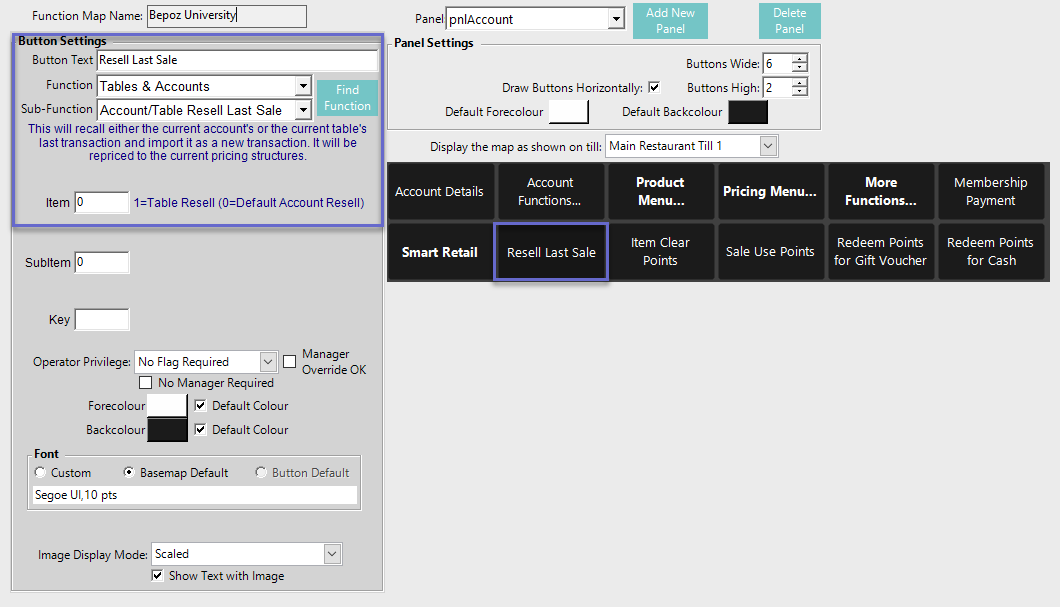
Function-Specific Configuration Options
- Enter a corresponding number into the Item field where:
- This is the default setting
- "0" will recall the most recent sale from the current Account
- "1" will recall the most recent sale from the current Table