Skip to content
  • There are no suggestions because the search field is empty.

📄"Auto Product Finalise" Voucher Type

This article covers the "Auto Product Finalise" Voucher Type and the Voucher-specific details that need to be entered during configuration.

Summary

  • This is the same as Auto Product except that the transaction automatically finalises with the presentation of the voucher
  • This is mainly used for entry situations where a ticket (voucher) is purchased and on presentation, the second product which is Entry is automated and finalized


Auto Product Finalise Setup

Set the Auto Product Finalise Voucher Type 
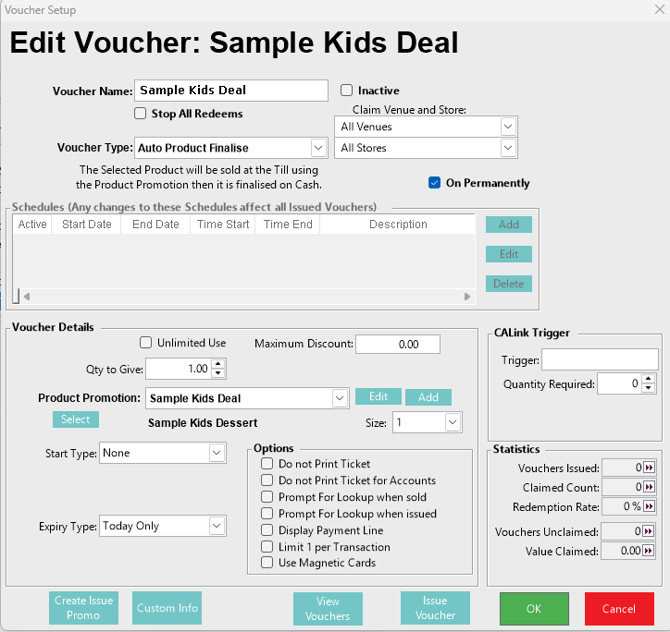
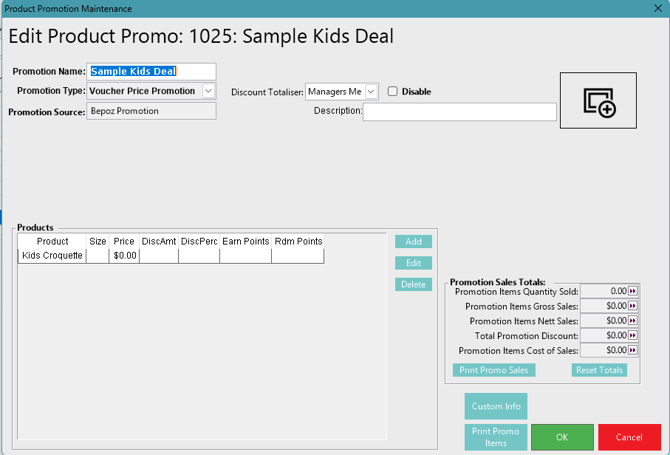
Set the Required Product Promotion that has the Auto Product Finalise assigned.
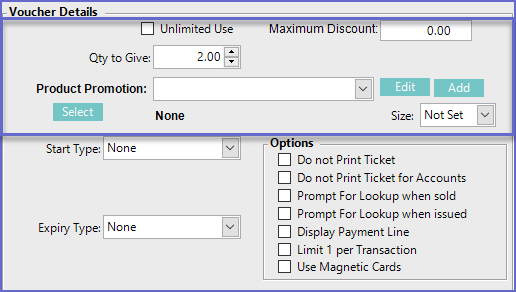
Additional Voucher Details

Flags/Fields

Description

Unlimited Use
  • If this flag is ticked on, the voucher will have no limit for its use and can be used multiple times
Maximum Discount
  • This sets the maximum discount amount that can be generated from the voucher
  • If the field is left at '0.00'. the voucher will have no maximum 
Qty to Give
  • This sets the quantity of product that will get discounted price by using the voucher
Product Promotion
  • This field will link the voucher to a product promotion
  • Product Promotions can be edited or new ones can be Added by clicking on the Edit button and Add button respectively which will open up the product promotion maintenance window
 Select (Product)
  • Sets a product for the voucher promo that is to be sold
Size
  • Sets the size of the product for the promo
  • For example, One Free 1L Coke

Once the Voucher has been issued and used it will sell the assigned product to the till and complete the sale to Cash