
Overview
This article contains notes on how to configure a receipt printer device for the Bematech LR2000 model.
The Bematech LR2000 is a rebranded printer. The original manufacturer is Logic Controls.
This article is a guide for the printer device setup only. It is not a comprehensive guide for the printer hardware itself, however, printer manual is included for reference.
📌 Note: While this printer hardware can be used with Bematech KDS, this is not a requirement. Both pieces of hardware can function separately.
Hardware Images
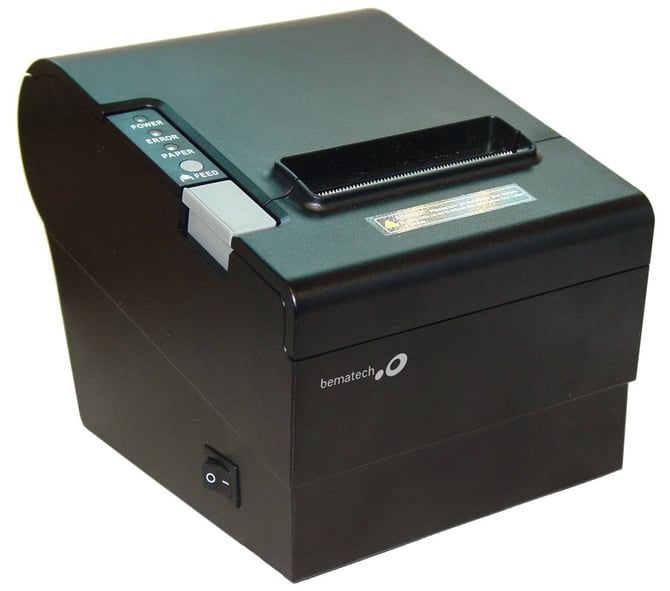
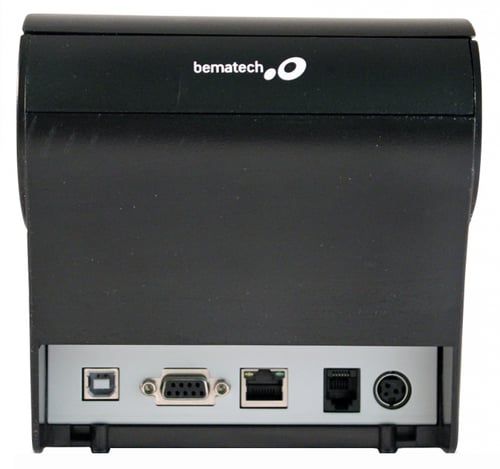
Self-Checking Function
The self-checking function allows the user to confirm whether the printer is operating normally.
Run the self-check before configuring the printer device in bepoz. The printed self-check list includes printer settings such as the interface type and baud rate, which can be used to confirm the correct communication settings.
If the printer is detected with a failure condition, contact the distributor.
- Confirm the printer is powered off.
- Press and hold the FEED button.
- Switch on the printer power supply while the FEED button is still pressed.
- Confirm the self-checking list prints when the printer powers on.
The self-checking function prints part of the character set, command mode, interface type, printer settings, DIP switch settings, and related configuration details sequentially.
The auto-cutter cuts the receipt paper immediately when printing is finished.
After the self-check printing process is complete, the printer automatically enters data receipt mode.
Printer Device Setup
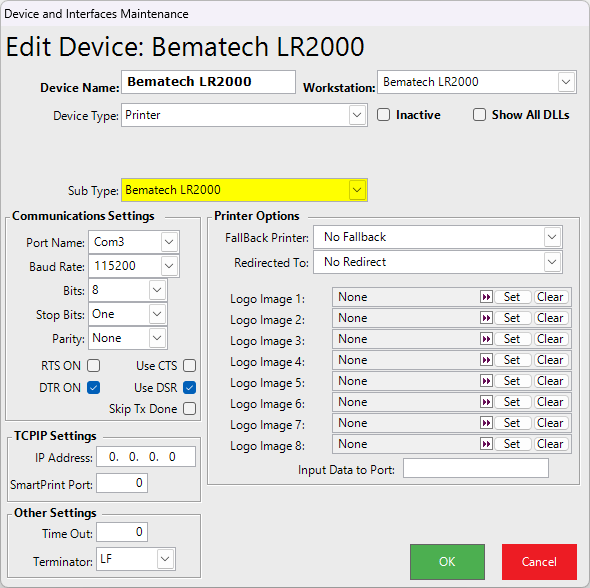
Use Device and Interfaces Maintenance to configure the receipt printer device.
-
In bepoz, select one of the ESCPOS printer subtype variants for the Bematech LR2000. Older versions of the software may instead show a named Bematech printer variant. If a named Bematech LR2000 option is available in an older version, use that option. See Device Setup Steps below.
| Printer Option | Use? | Why |
|---|---|---|
| ESCPOS | Yes | Best generic match for the LR2000 in bepoz v4.9+ |
| ESCPOS 9x7 | Only if print width or font spacing is incorrect | Alternate font and character layout. |
| ESCPOS 9x7 56 Char | Only if docket line wrapping is incorrect | Forces narrower 56-character formatting. |
| Named Bematech Variant | Only if shown in an older version | Older bepoz software versions may display a printer subtype specifically named for Bematech or the LR2000. |
Device Setup Steps
Create or edit the receipt printer device.
Confirm Device Type is set to Printer.
Set Sub Type to the appropriate Bematech or ESCPOS option.
Confirm the relevant Workstation is selected.
Configure the communication settings for the connected printer.
Setting Value Port Name Comm port used by the printer, such as Com3 Baud Rate Use the baud rate shown on the self-check printout, commonly 115200 Bits 8 Stop Bits One Parity None RTS ON Disabled Use CTS Disabled DTR ON Enabled Use DSR Enabled Skip Dx Done Disabled Confirm FallBack Printer is set as required.
Confirm Redirected To is set as required.
Configure any required Logo Image fields.
Click OK to save the printer device.
Diagnostics Error Lights
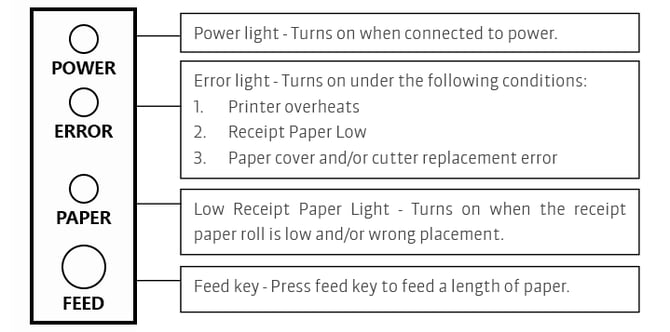
Use the printer indicator lights to assist with basic printer diagnostics.
| Indicator or Key | Meaning |
|---|---|
| Power Light | Turns on when connected to power. |
| Error Light | Turns on when the printer overheats, receipt paper is low, or there is a paper cover and cutter replacement error. |
| Low Receipt Paper Light | Turns on when the receipt paper roll is low or requires replacement. |
| Feed Key | Press the feed key to feed a length of paper. |
If the printer is not responding, confirm the printer has power, the paper roll is installed correctly, and no error lights are active before changing the bepoz printer device settings.
Hardware Manual
updated to: bepoz v4.9.0.2