
Overview
Cooking the Books helps the chef with the kitchen stock management. It provides them with
the costing based on the recipe of the ingredient used and wasted.
Cooking the books requires POS sales to calculate all the costing based on the sales of the product.
Cooking the books is a Paid Integration. Contact your Account Manager.
Issue 1
Received Files Not Correctly formatted
Troubleshooting Issue 1
Being as the files are exported as CSV, which are Comma Separated Excel files, Product Names should NOT contain Commas.
1. Go through each exported daily file and identify the Culprit Products
2. Contact the Customer (POS Admin/Senior Management) and edit the Products (Short Name only) take out the Commas. But only those Sorts/Types that are exported to CTB, i.e Not all Products with Comms). Remove the Commas from the Product Names.
3. Send the full database to [all] Venues
4. Reprocess the corrupt (Missing) CTB files - Full Export Process below in 4.
5. Confirm CTB have received the correct data files.
Issue 2
Files not Received
Troubleshooting Issue 2
1. Check the Venue settings, Messaging Tab. Test the Email Settings and confirm they work.
2. Open the CTBExport.exe program. Check that Email to CTB is flagged on.
3. The Venue ID to Email should be the Head Office Venue ID. Confirm it is.
Any issues with Email, ask CTB to install and configure their POSIntegrator and give them the paths where the files are exported.
4. To Re-Export Missing files:
-
On the CTBExport.exe program.
-
Click on the Exporter Tab.
-
Set the Date From and Date To, then Select the Venue or All Venues to be reported on.
-
Click Export
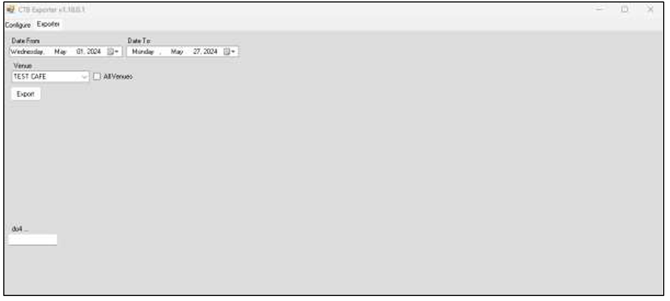
- Click Done and close CTB. Files will be exported to \Bepoz\CTB-ManualExport. If they are not automatically Emailed, and they can be zipped up and emailed to support@cookingthebooks.com.au as a back-up
-
Close the CTBExport.exe program.
5. Check the Scheduled Job.
- Did it Run? Were the Files Created?
- if No, check the Job paths are all correct.
6. Try a different version of CTBexport.exe is 1.18.01 is not working
Any other issues refer to the Full CTB setup Guide here.
Confirm with CTB they received the files. support@cookingthebooks.com.au
For further troubleshooting contact Bepoz Support on 02 9556 3566
Updated to Bepoz version 4.9.0.1