
Summary
- This Voucher simply will apply an Order Discount Percent to the current transaction
- Types of applications include:
- 2.00% off any transaction
Discount Percent Voucher Setup
Set the Voucher Type to Discount Percent
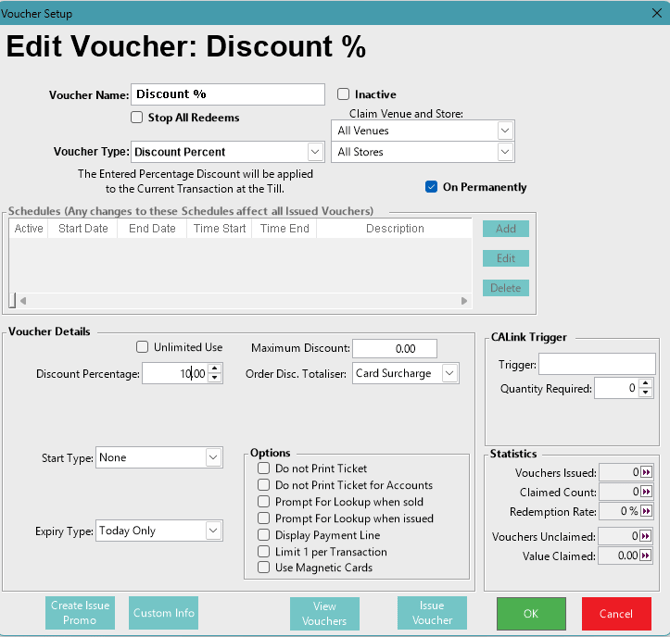
Additional Voucher Details
Flags/Fields |
Description |
| Unlimited Use |
|
| Maximum Discount |
|
| Discount Percentage |
|
| Order Disc. Totaliser |
|
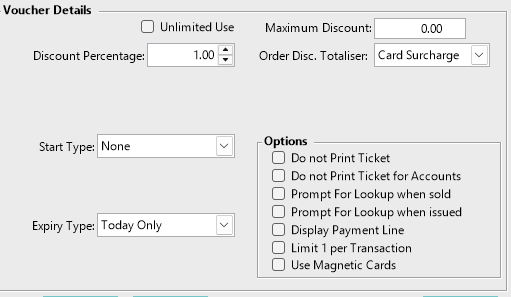
Voucher Detail Options
Do not Print Ticket- Means when issuing a voucher no ticket will print.
Do not Print Ticket for Accounts- When issuing a voucher to an account it will not print a ticket it will put the voucher into the account for redemption.
Prompt for Lookup when Sold- Any time a voucher is to be redeemed a prompt will appear asking for the lookup number for confirmation before it can be redeemed
Display Payment Line- Selecting this flag means the Payment Line is shown and printed on the Transaction area of the POS and receipt, when the voucher is redeemed. This is usually off as Show Discounts is usually turned on, on the receipt format.
Limit 1 Per Transaction- Will only allow one product from the promotion to be redeemed in any transaction
Use Magnetic Cards- Will print and encode vouchers to magnetic cards. This can not be done from a POS.