
Overview
Products are items that are used to be sold and purchased by Customers within your Venue.
In BackOffice, Products can be configured to cater to the needs and requirements of the business.
Prerequisites
- Operator Privilege to Use BackOffice
- Operator Privileges to View and Edit Products
Products Explained
Products are the core of bepoz, representing the items and services your Venue sells to your Customers, and in many cases need to be purchased from Suppliers first.
Products may be physical or non-physical, depending on their purpose in the system; they are classified under two main Stock Modes:
Stock Mode |
Description |
|---|---|
| Stocked Items |
|
| Non-Stocked Items |
|
🔗Further Reading: Stocked vs Non-Stocked Explained
Tips for Editing
Products are accessed in BackOffice via the Maintenance menu. After logging in, select Maintenance — 'Product' is the first option in the list.
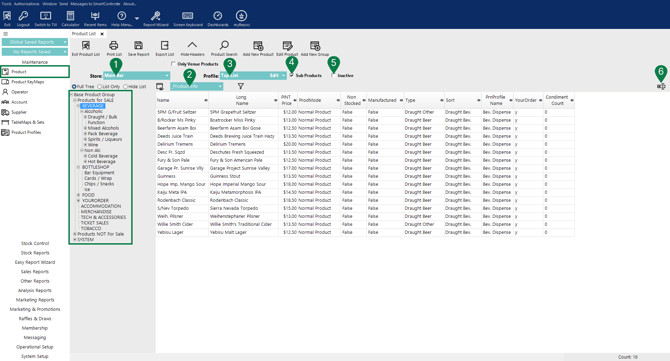
Once you open Product, the Product List displays as a tree structure. The + / – icons beside each branch allow you to expand or collapse the list to help refine your search.
Several editing features are available to guide you:
-
Store
Selecting the 'Store' (if there are more than one) will display Products available in that Store in black text, Products not available in that Store will display in green text. In a Multi-Venue system, you will see an additional option to select the Venue as well:

-
Views
Changing the 'View' will display different information (columns), Views can be edited and/or copied as per the Operator's needs.
-
Profile
'Product Profiles' (once created) allow you easily narrow down the Products which are displayed.
-
Sub Products
The 'Sub Products' flag displays ALL Products from the highest branch selected in the Product Tree.
-
Inactive
The 'Inactive' flag displays Products which have previously been made inactive, they will display in red text:

-
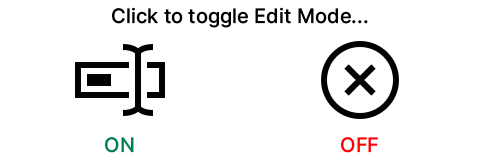
Edit Toggle (On/Off)
Edit Mode allows you change Product details in the BackOffice directly without opening the Product Edit screen.
updated to: bepoz v4.8.2.1