Overview
Some scales will produce labels with an “In-House” barcode on it. This is a special barcode that contains the product number being sold and the selling price. It is typically used in a “deli” for cold meats etc.
The Product is NOT set as a scale product, however the base size and the selling size is
set to either 1000 Grams (Kilograms) or 16 Ounces (Pounds).
The barcode will always start with either a ‘2’ for 12 digit barcodes (UPC) or ‘02’ for 13
Digit barcodes (EAN).
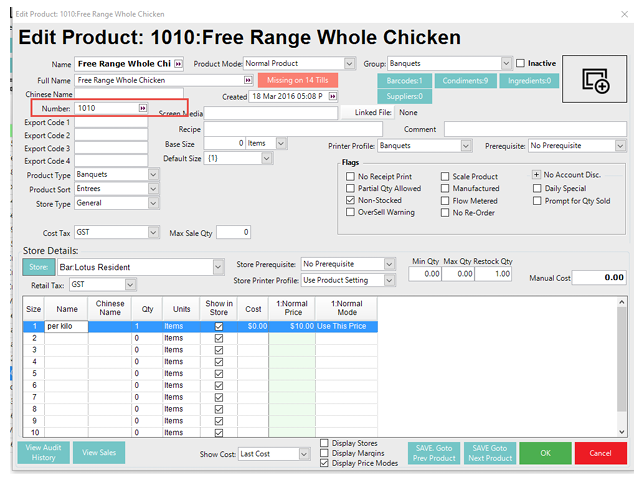
The Product Number is set in the Number field of the product setup screen. This should
be a 5 digit number (It can be less but must have leading zeroes).
The price may be a 4 digit or a 5 digit number. To allow for 5 digits, the product number
check digit is omitted and this position used as the 5th price digit. There is a flag in the
Venue record that determines this.
Prerequisites
- For an operator to be able to access the Price copy feature, following operator privileges are required to be enabled
- Relevant 'Products' Flags
- Add, Edit and Delete barcodes
Price 2 Barcode
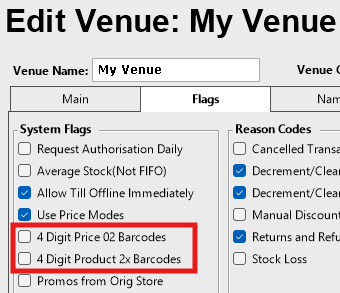
If unflagged it means they will be 5 Digit priced
Barcodes
The Barcode format is as follows:
4 Digit Price
02NNNNNCPPPPC e.g. 0212345915008
NNNNN = Product Number (12345)
PPPP = Price (1500)
C = Check Digit. (9 & 8)
5 Digit Price
02NNNNNPPPPPC e.g. 0212345015008
NNNNN = Product Number (12345)
PPPPP = Price (01500)
C = Check Digit. (8)
For example:
If you want to create 4 digit priced barcode ($22.16 in question) for the product below, you will need to create it as (0201010022168)
The above priced barcode has been broken down as two sector:
a) product number i.e. 1010.
b) price number i.e $22.16 0201010022169
Example as below: