
Overview
Multi-buy Promotions are used where the Promotion is triggered by selling a certain quantity of a product, or by selling a certain combination of Products.
This is often used in Bottleshops where you want to sell any two of a selection of Products for a set price, or where when you buy one Product, you get another at a discounted price.
Prerequisite
- To setup the Multibuy Voucher you need Operator Privilege to Maintain Voucher Setups
Product Promotion - Multi-Buy Setup
The Voucher Type should be set to Multi Buy promo
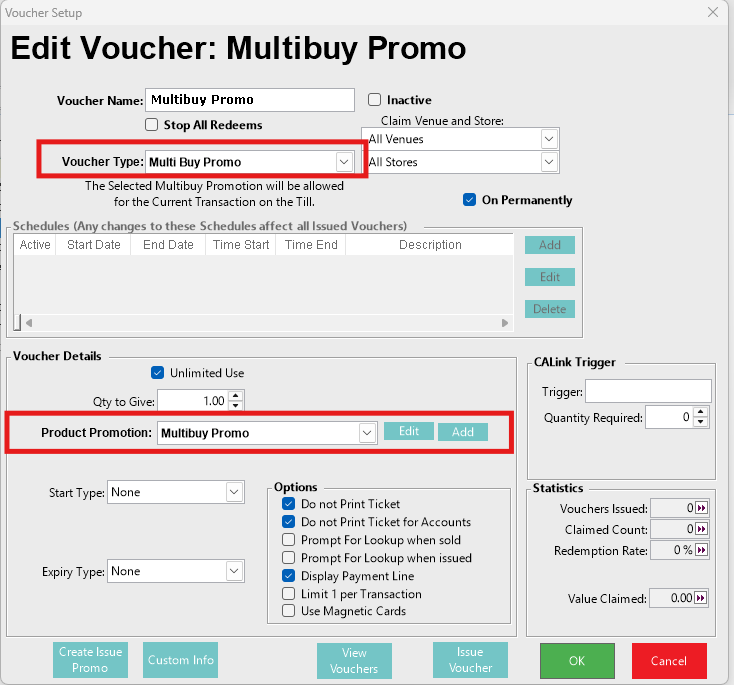
NOTE: The Product Promotion Multi-Buy promotion can be setup first and selected through the Voucher setup
In the Product Promotion drop down, select "Not Set" then click Add to set up a new MultiBuy product promotion
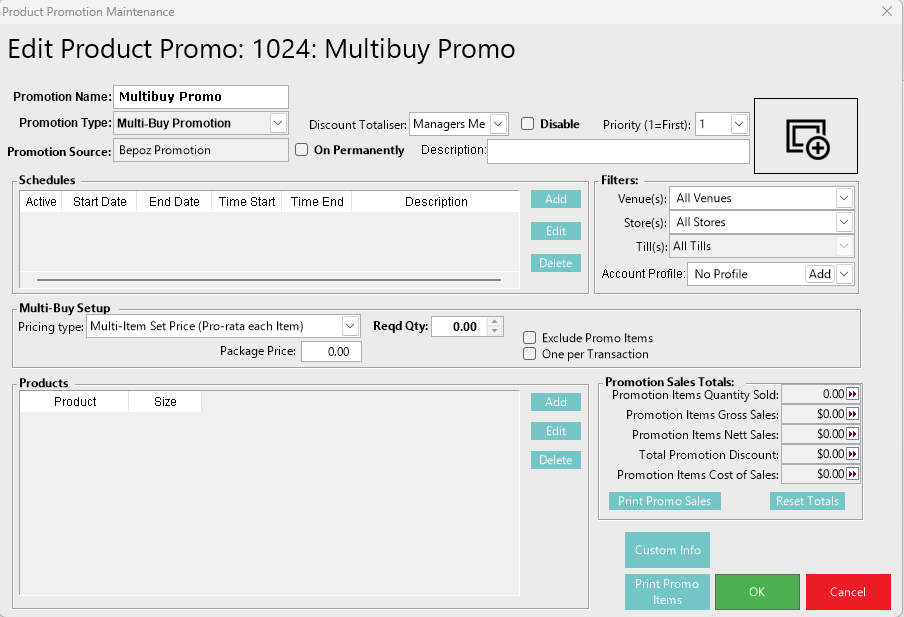
In the Multi-Buy Setup: Pricing Type drop down select the required Type.

The Types and configurations are explained below:
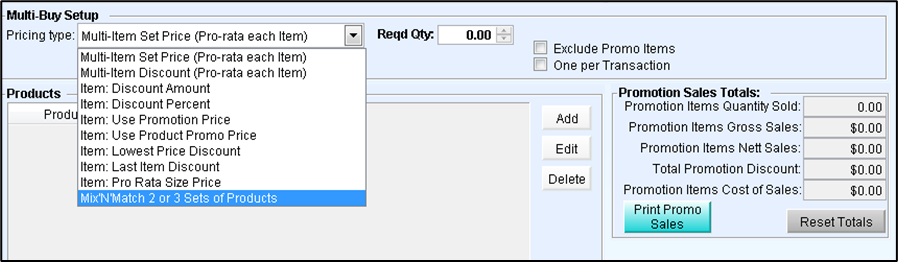
Multi-Item Set Price (Pro-rata each item)
This is used to setup promotions where the required qty is a set price. It will sell the whole transaction at the set price when it qualifies for promotion.
(e.g. Buy any 3 Tyrell’s Variety for $20)
Multi-Item Discount (Pro-rata each item)
This is used to setup promotions where the required qty is a set discount and is a percentage of the whole transaction.
(e.g. Buy any 6 bottles of wine and receive 10% off)
Item: Discount Amount
This is used to setup promotions where the required qty discounts by the amount specified for each product.
(e.g. Buy 3 long necks of VB and receive $1 off each bottle)
Item: Discount Percent
This is used to setup promotions where the required qty discounts by the percentage specified for each product.
(e.g. Buy 3 long necks of VB and receive 10% off each bottle)
Item: Use Promotion Price
This is used to setup promotions where the required qty sells at the price specified for each product.
(e.g. Buy 3 long necks of VB for $3 each)
Item: Use Product Promo Price
This is used to setup promotions where the required qty sells at the price specified at the product level.
(e.g. Buy a bottle of Tyrell’s Sauv/Blanc and receive a bottle opener for $2)
Item: Lowest Price Discount
This is used to setup promotions where the required qty is needed to be sold and then discounts the lowest price out of the required qty.
(e.g. Buy any 3 wines and get a 25% discount on the cheapest item)
Item: Last Item Discount
This is used to setup promotions where the required qty is needed to be sold and then discounts the last product sold.
(e.g. Buy any 3 wines and get the 4th with a 25% discount)
Item: Pro Rata Size Price
This is used to setup promotions where the required qty is needed to be sold then the products are repriced based on the pro rata size specified.
(e.g. A bottle of wine costs $10. If a case is bought, it is sold for $50. The promotion would then allow the bottle to be sold at $8.35 each only when the required qty is qualified.
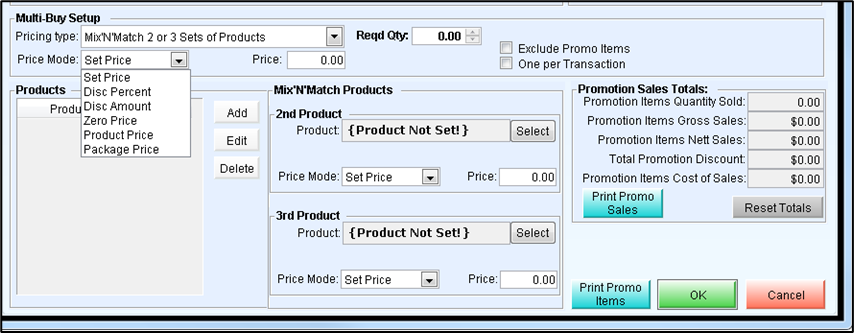
Mix ‘N’ Match 2 or 3 sets of Products
This is used to setup promotions where the required qty is sold, then applies a percentage discount to another product, which in turn can apply a discount to a third product or group.
(e.g. Buy any Main Meals and get a dessert at 50% discount and then get a bottle of wine at 50%. (all conditions have to be met)
Options
Required Qty
This is the number of items that need to be purchased in order to be eligible for this Multi-Buy promotion.
Subsequent items
For every valid product sold after the requirement criteria is achieved this product will also have the promotion applied to it.
Include Package Contents
Items within a Package will also be credited towards triggering the promotion
Exclude Promo Items
This flag means that any, already configured, Promotional items will be ineligible for the Multi-buy price.
One per Transaction
This flag will limit this Multi-buy to be used only once per transaction.