
Overview
Each SmartPOS Workstation can have a Default KeySet assigned to it in BackOffice
Prerequisites
- To access KeyMap and KeySet features, the applicable Operator Privileges will need to be enabled
- Products: "Maintain Keymap Settings" Flag
- Operator Maintenance 'Maintenance' Tab
Setting a Default KeySet
- To find the Default KeySet Setting for a Workstation, follow these steps after logging in to BackOffice:
- From the System Setup menu, select Venue, Stores, & Tills
- Select the Workstation from the Global Settings list (double-click or right-click and select Edit Workstation)
- In the Workstation Maintenance window that opens, select the desired KeySet from the Default KeySet drop-down selector
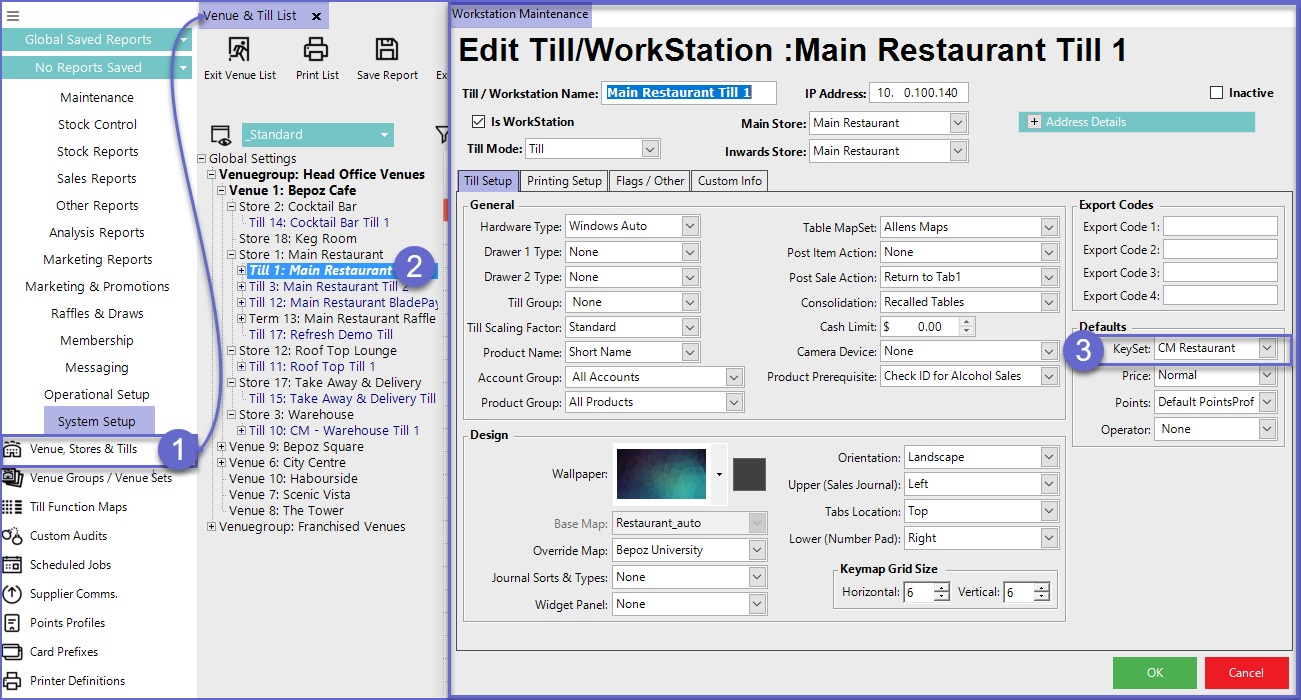
- The KeySet is then assigned to the Workstation, which will display all of the KeyMaps within that KeySet
- The different KeyMaps will be displayed at the top of the SmartPOS Workstation screen in tab form