
Overview
In bepoz, a Product’s Stock Mode determines how that Product is purchased, sold, transferred, counted, manufactured, and reported on.
Stock Mode selection is an important part of Product setup because it controls which stock functions are available and whether Quantity on Hand, Cost on Hand, Sales, Usage, or Purchase data is recorded.
Changing a Product’s Stock Mode after the Product has been used in the database is not advised and is usually not permitted by the system. This includes Products that have already been purchased, transferred, manufactured, sold, adjusted, or counted.
The six Stock Modes are:
- Stocked
- Non-Stocked
- Manufactured
- Non Stocked Purchase Only
- Consumables
- Auto-Manufactured
Stocked
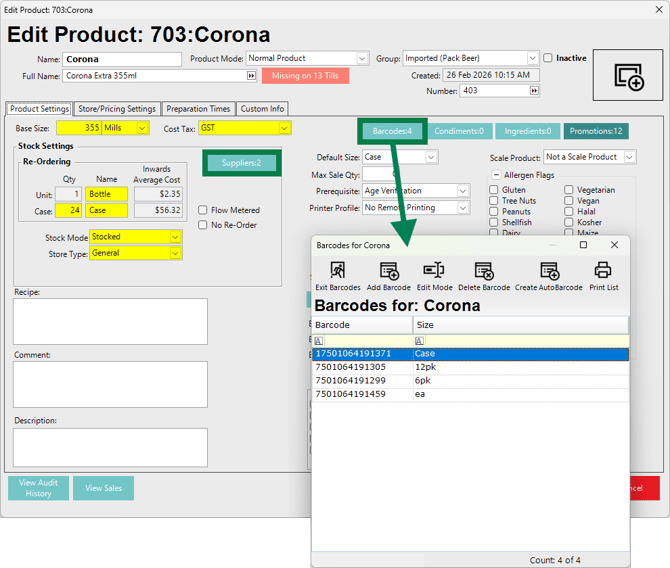
Stocked Products are Products that are purchased and physically managed in stock.
A Product is usually considered Stocked when it can be purchased, transferred, counted, quantity adjusted, and reported on in the same base unit or stock unit that it is purchased in.
Common examples include:
- Packaged beverages
- Ingredients for menu items, such as produce, proteins, dairy, poultry, and similar goods
- Dry goods and canned goods
Stocked Products usually have re-ordering fields available for configuration. These fields are used to maintain purchase units and standard quantities, such as case sizes or pack sizes.
Those same units and quantities are then used throughout bepoz when:
- Creating Purchase Orders
- Receiving stock
- Transferring stock
- Completing Stocktakes
- Reviewing Quantity on Hand and Cost on Hand
Stocked Products should not usually have Ingredients configured against them. If a Stocked Product is sold, it is typically sold as-is, either in the same base unit it is purchased in or as a portion of the base size.
For example, beverages may be purchased by case or bottle but sold by bottle, millilitre, or ounce depending on the configuration.
Stocked Products may also have preferred Suppliers and Barcodes assigned to them.
Non Stocked
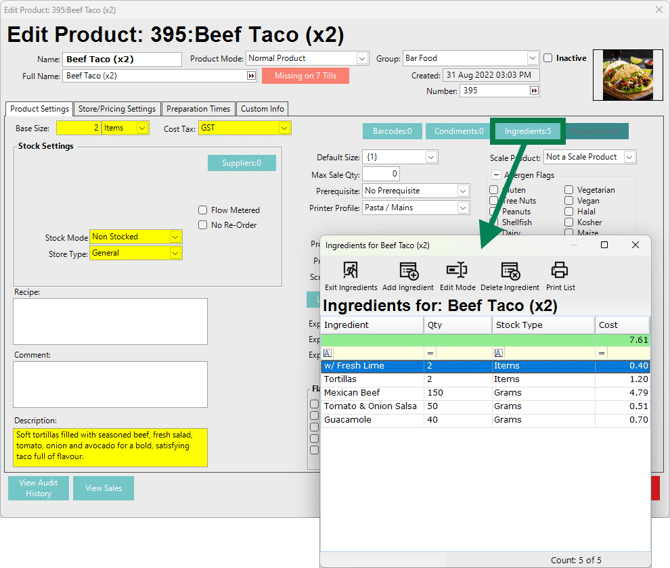
Non Stocked Products are Products that need to exist in the database, typically so they can be sold and reported on, but are not purchased as the finished item.
A Product must exist in the Product list before it can be added to a KeyMap. This means a sellable item may need to be created even when it is not physically purchased as a finished Product.
A common example is a food menu items and cocktails:
- The food item is sold to the customer
- The food item is made to order
- The ingredients are purchased and stocked separately
- The food item itself is configured as Non-Stocked
Non-Stocked Products are commonly used for
- Made-to-order cocktails
- Menu items
- Meal deals
- Package Products
- Other Products that are sold but not purchased as a completed item
- Condiment Products which are purely instructions, such as cooking temperatures for protein
Where accurate stock figures are required, Non-Stocked Products should have Ingredient Products configured. These Ingredients are usually Stocked Products or Manufactured Products.
When a Non-Stocked Product is sold, the configured Ingredient quantities are deducted from stock. This helps maintain accurate Quantity on Hand values for the underlying Ingredients.
Non-Stocked Products do not use the re-ordering section because they are not purchased as finished stock items.
The Description field can be used to provide a menu-style summary of the item when it appears on the self-serve Kiosk.
Manufactured
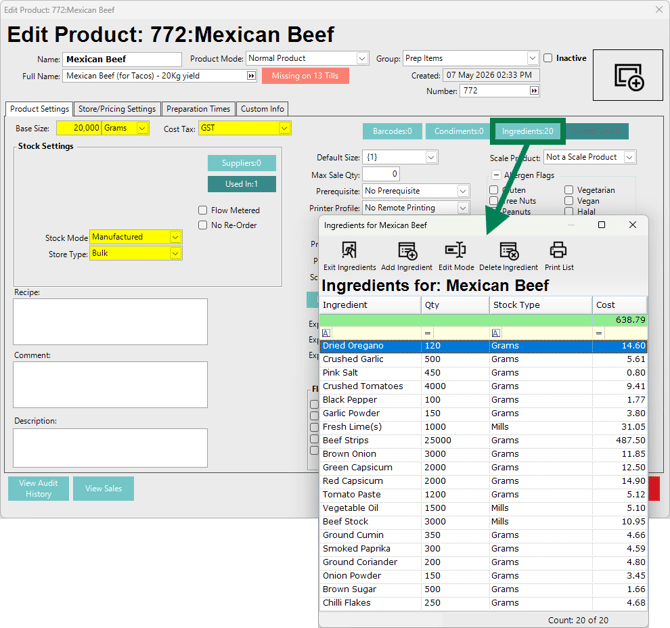
Manufactured Products are Products that must be manufactured before they can be sold, counted, or physically managed as finished stock.
Unlike Non Stocked Products, Manufactured Products are usually not made to order at the time of sale. They are produced from Ingredients in advance, and the finished Product then becomes stockable.
Manufactured Products can be made from:
- Stocked Products
- Other Manufactured Products
When a Manufactured Product is processed in bepoz:
- Stock is deducted from the Ingredient Products.
- Stock is created for the Manufactured Product.
- The Manufactured Product can then be counted and managed as stock.
Common examples include:
- Bulk food ingredients
- Pre-made sandwiches
- Pre-made salads
- Cakes, pies, and other baked goods
- Bulk cocktails such as sangria
Manufactured Products are useful when a business prepares an item before sale and needs to track the finished quantity separately from the raw Ingredients used to create it.
Non Stocked Purchase Only
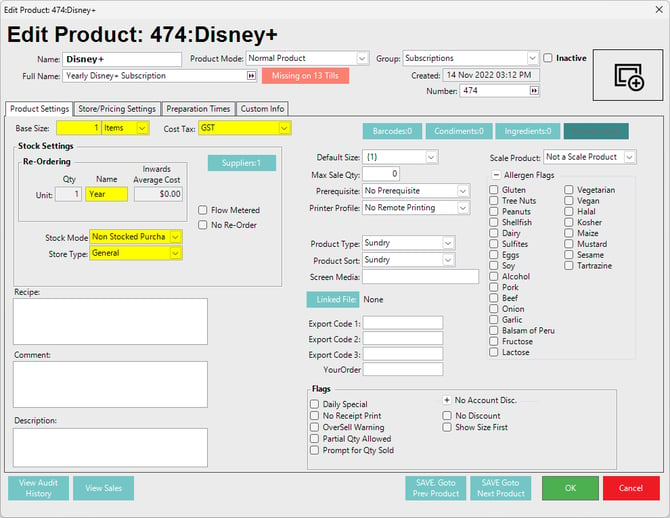
Non Stocked Purchase Only Products can be purchased and received, but they cannot be sold, transferred, adjusted, or counted in Stocktakes.
As the name suggests, these Products are intended for Purchase activity only.
📌 Note: Non-Stocked Purchase Only Products cannot be added to KeyMaps. This prevents them from being sold at the POS.
These Products can be purchased and received using the standard Purchase Order process, but only with Purchase Order types that do not rely on Sales history or Quantity data. This is because Non-Stocked Purchase Only Products do not maintain stock quantity.
They can also be credited or refunded by processing negative purchases.
No Quantity on Hand or Cost on Hand is recorded for Non Stocked Purchase Only Products.
Common examples include:
- Electricity, gas, water, and other utilities
- TV, internet, music, or entertainment subscriptions
- Recurring services such as linen hire, floor mat cleaning, fryer oil exchange, or florist services
When purchased, Non Stocked Purchase Only Products can appear on the Period Summary Report as a monetary total. Additional reporting may also be available through related Purchase reports, such as the Stock Purchase Report.
Because these Products do not record Quantity or Cost on Hand, they do not appear in stock summary reports that rely on stock quantity or stock cost data.
Consumables
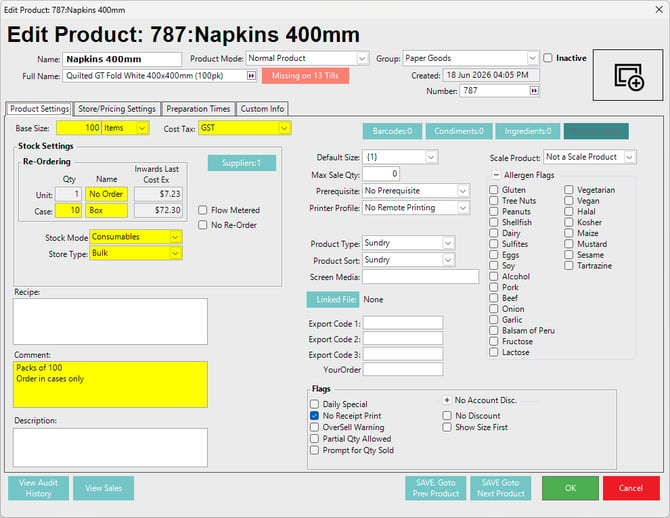
Consumable Products can be purchased and received, but they cannot be sold.
Like Non-Stocked Purchase Only Products, Consumables cannot be added to KeyMaps. This prevents them from being sold at the POS.
Unlike Non-Stocked Purchase Only Products, Consumables behave more like Stocked Products for stock management purposes. Consumables can be:
- Transferred
- Quantity adjusted
- Counted in Stocktakes
- Reported on for Quantity on Hand
- Reported on for Cost on Hand
Consumables are used as part of daily operations rather than sold directly to customers.
Common examples include:
- Napkins
- Single-use cutlery
- Straws
- Take-away containers and bags
- Plastic wrap, baking paper, aluminium foil, gloves, and other back-of-house disposable goods
- Bar supplies, cut gloves, or other operational supplies that the business wants to count and cost
Some items that appear to be Consumables may instead be managed as Stocked Products if they form part of a sellable item’s Ingredients. For example, take-away containers may be configured as Ingredients for a Non-Stocked or Manufactured Product if the business wants their cost deducted as part of a sale.
Consumable reporting is based on Usage rather than Sales.
Usage is calculated as:
- Quantity Usage = Quantity on Hand - Quantity Counted
- CostEx Usage = Usage x CostEx
Consumable Usage data can be reviewed using reporting columns such as:
- Quantity Usage
- CostEx Usage
- Cost Variance %
These columns may be available on reports such as:
- Stocktake
- Stock Summaries
- COGs by Stocktake
- COGs by Period
Consumable Usage reporting can help identify unexpected changes in operational usage.
For example, if napkin usage is normally two cases per month and suddenly increases to five cases, the variance may require investigation.
Possible causes include:
- A justified operational reason, such as paper towels being out of stock and napkins being used instead
- Theft or unapproved removal of stock
- An incorrect Purchase, Transfer, or Adjustment entry
- An incorrect Stocktake count
- An incorrect starting Quantity on Hand at the beginning of the reporting period
Auto Manufactured
Auto Manufactured Products are used when a Manufactured Product may be required as an Ingredient for another Manufactured Product, but there may be insufficient or no Quantity on Hand for the Ingredient Product.
This is most useful for nested Manufactured Products, where one Manufactured Product is used as an Ingredient inside another Manufactured Product.
For example:
- A pre-made sandwich is configured as a Manufactured Product.
- The sandwich includes a house-made sauce.
- The sauce is also a Manufactured Product.
- The sauce may be configured as Auto Manufactured if it is only manufactured as part of producing the sandwich.
Auto Manufactured Products help support manufacturing workflows where an Ingredient Product may need to be created automatically as part of manufacturing a parent Product.
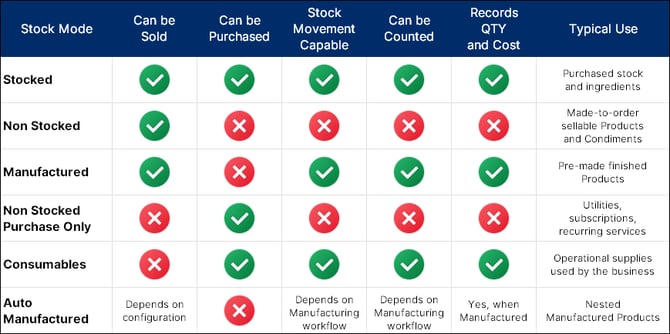
Stock Mode Comparison
updated to: bepoz v4.9.0.3