
Overview
Your bepoz system is backed by a dedicated team of support specialists. Our Support Team consists of well-trained engineers, technicians, and hospitality specialists, equipped to assist with both hardware and software, and supported by full remote access capabilities.
This guide provides a clear overview of the tools, contact methods, and services available to help you get the most from your system — anytime you need assistance. There are several ways for bepoz users to access help, and if you’re reading this article, you’re already in the right place.
International Support
For customers outside Australia, international support options are listed at the bottom of this article (click here).
Self Help Options
1. Report Wizard
A central access point for a wide range of pre-created reports. They are presented in the Report Wizard grouped into Categories for easier navigation. All reports found here are also available in the standard BackOffice menu.

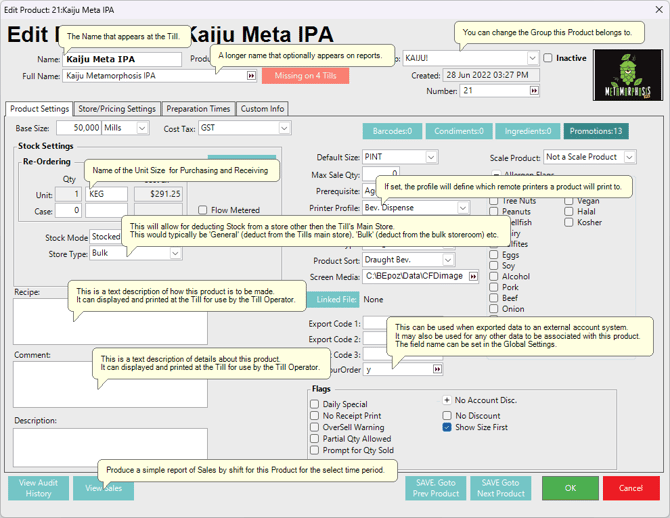
2. Speech Bubbles
Hover your mouse over most areas of BackOffice to view helpful tooltips explaining features and expected inputs. Below image, 'Product Edit':
3. bepoz Help Centre
Visit help.bepoz.com for articles and videos that guide you through your Bepoz system — from beginner to advanced level.
bepoz Technical Support
1. Phone Support (AUS)...Urgent Issues (Priority 1 & 2)
Speak directly with a technician for urgent matters. Included with your subscription license at no extra cost during business hours (AEST):Monday to Friday; between 9:00am - 5:00pm
Call: 1300 023 769 - option 2
- This action will log a Ticket into our HubSpot CRM
2. Support Email...Non-Urgent
Email: bepoz.au.support@oolio.com
- This action will log a Ticket into our HubSpot CRM
3. Helpdesk Email...Non-Urgent
Use this if BackOffice is configured with email settings or if you prefer Outlook.
This action will log a Ticket into our HubSpot CRM

4. Website Ticket Submission...Non-Urgent
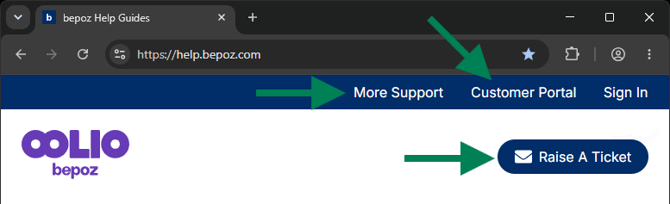
Use the More Support or Raise a Ticket links at the top of this website to manually create a ticket in our HubSpot CRM.
If you have Customer Portal access, you can view updates on all outstanding tickets and additional account information.
After-Hours Phone Support
Emergency Support (Trade-Affecting Only)
Available outside of regular business hours for critical issues impacting trade.
After-hours technicians may not be able to resolve all issues immediately but will escalate non-urgent matters for follow-up the next business day.
Call: 1300 023 769 - option 2
Onsite Visit Callouts
1. Onsite Visits to Metro Area
Callouts to metro areas include the first 15 minutes onsite. Any additional time is billed in 15-minute increments.
2. Business Hours vs After-Hours Rates
Callouts performed during standard business hours are billed at the standard rate.
After-hours, weekend, and public holiday callouts attract higher rates due to limited staffing and availability requirements. Our team will advise the applicable rate when scheduling your visit.
3. Metro Area Coverage
The metro area is defined as locations within 40 km of the CBD.
4. Travel & Parking
Please inform our staff about onsite parking where available.
Metro travel is complimentary during regular business hours
Travel outside the metro radius is charged both ways, based on distance
Interstate travel and flights are charged at cost
If overnight accommodation, meals, or parking fees are required, these will also be charged at cost
Training
We offer tailored training sessions — remote, in-house, or onsite at your venue.
Whether you need one-on-one support or group training, we can customise a program to suit your needs.
Contact your Account Manager for more information.
International Support (for Non-Australian Customers)
Please be aware that each country will have its own Support guidelines for business/after-hours support.
New Zealand
- email - bepoz.nz.support@oolio.com
- phone - 09 870 4200
United Kingdom
- email - bepoz.uk.support@oolio.com
- phone - 020 3151 5688
USA
- email - support@bepoz.com
- phone - (855) 313-0857
updated to: bepoz v4.9.0.4