
About NanoPAD X
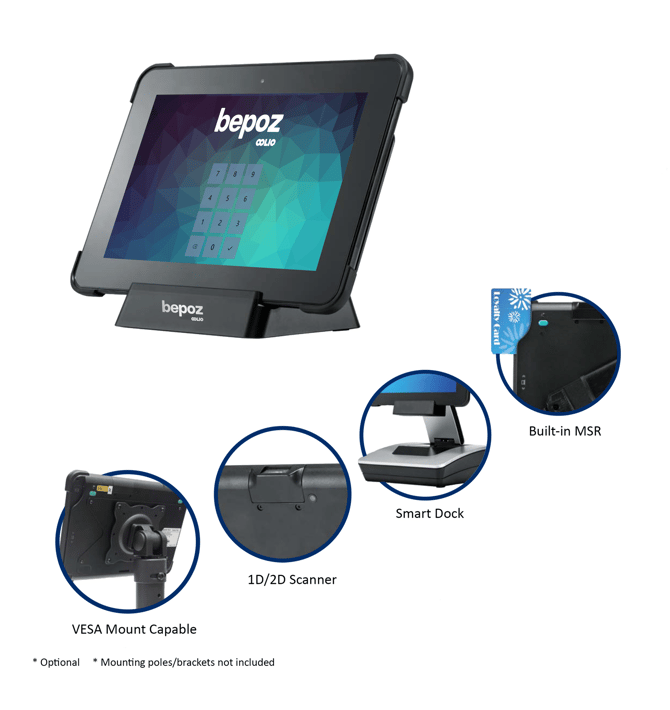
The NanoPAD X is a Windows-based POS tablet designed for countertop or VESA-mounted use with bepoz. It supports optional peripherals such as a Smart Dock, built-in MSR, and an integrated 1D/2D Scanner.
What you need
-
NanoPAD X tablet
-
Compatible power adaptor
-
Network access (Wi-Fi or Ethernet via Smart Dock)
-
Optional: Smart Dock, cash drawer, barcode scanner, MSR, VESA mount hardware
Note: Optional accessories and mounting poles/brackets may not be included with the device.
Hardware overview
Core components
Tablet: 10.1" touch display running Windows
Charging dock: Basic dock for charging and tablet positioning
Smart Dock (optional): Adds additional ports (including Ethernet, serial ports, and cash drawer)
Common optional features
Built-in MSR (magnetic stripe reader)
1D/2D Scanner
VESA mount support (75 × 75 mm or 100 × 100 mm patterns)
Specifications
System
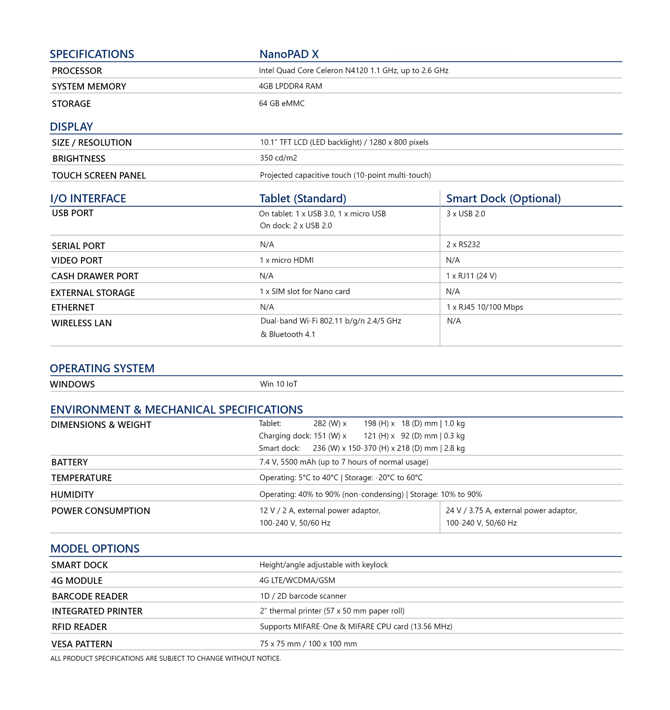
Processor: Intel Quad Core Celeron N4120 1.1 GHz (up to 2.6 GHz)
Memory: 4 GB LPDDR4 RAM
Storage: 64 GB eMMC
Operating system: Windows 10 IoT
Display
Size / resolution: 10.1" TFT LCD (LED backlight), 1280 × 800
Brightness: 350 cd/m²
Touch panel: Projected capacitive, 10-point multi-touch
Ports and connectivity
|
Interface |
Tablet (standard) |
Smart Dock (optional) |
|---|---|---|
|
USB |
On tablet: 1 × USB 3.0, 1 × micro USBOn dock: 2 × USB 2.0 |
3 × USB 2.0 |
|
Serial |
N/A |
2 × RS232 |
|
Video |
1 × micro HDMI |
N/A |
|
Cash drawer |
N/A |
1 × RJ11 (24 V) |
|
External storage |
1 × SIM slot for Nano card |
N/A |
|
Ethernet |
N/A |
1 × RJ45 10/100 Mbps |
|
Wireless |
Dual-band Wi-Fi 802.11 b/g/n (2.4/5 GHz) and Bluetooth 4.1 |
N/A |
Environmental and mechanical
Dimensions & weight
Tablet: 282 (W) × 198 (H) × 18 (D) mm | 1.0 kg
Charging dock: 151 (W) × 121 (H) × 92 (D) mm | 0.3 kg
Smart dock: 236 (W) × 150–370 (H) × 218 (D) mm | 2.8 kg
Battery: 7.4 V, 5500 mAh (up to 7 hours of normal usage)
Temperature: Operating 5°C to 40°C | Storage -20°C to 60°C
Humidity: Operating 40% to 90% (non-condensing) | Storage 10% to 90%
Power
Tablet: 12 V / 2 A external power adaptor (100–240 V, 50/60 Hz)
Smart dock: 24 V / 3.75 A external power adaptor (100–240 V, 50/60 Hz)
Set up the NanoPAD X for use
-
Unpack the tablet, dock, and any optional modules and confirm all parts are present.
-
Position the device on a stable counter, or mount it using a compatible VESA bracket (if required).
-
Connect the tablet to the dock or Smart Dock (if supplied).
-
Plug the power adaptor into the dock and switch on the power source.
-
-
Select a Wi-Fi network on the tablet and enter credentials, OR
- Connect an Ethernet cable to the Smart Dock (if using Ethernet).
-
-
Attach peripherals (if applicable):
-
Connect a cash drawer to the RJ11 port on the Smart Dock
-
Connect USB peripherals to available USB ports
-
Connect serial devices to RS232 ports on the Smart Dock
-
-
Confirm Windows loads correctly and the touch screen responds as expected.
-
Install the bepoz POS client and any required device drivers supplied by your deployment package.
-
Test connected peripherals (scanner/MSR/cash drawer/printer) to confirm they respond consistently.
Tip: If you are using multiple peripherals, connect and test one device at a time to quickly identify driver or cabling issues.
Optional modules and accessories
The NanoPAD X may be supplied or expanded with the following options:
-
Smart Dock: Height/angle adjustable with keylock
-
4G module: 4G LTE/WCDMA/GSM
-
Barcode reader: 1D/2D barcode scanner
-
Integrated printer: 2" thermal printer (57 × 50 mm paper roll)
-
RFID reader: Supports MIFARE-One and MIFARE CPU cards (13.56 MHz)
-
VESA mount patterns: 75 × 75 mm and 100 × 100 mm
Caution: Product specifications can change without notice. Confirm the exact module set fitted to your device before deployment.
Next steps
-
If the NanoPAD X will be used as a fixed POS lane, use the Smart Dock to add Ethernet and cash drawer connectivity.
-
For stable operation, ensure Windows updates and device drivers are managed according to your organisation’s IT policy.
-
If peripherals do not respond, verify cabling, power, and driver installation before escalating.
updated to: bepoz v4.8.2.1