
Overview
This article explains the Oolio monthly invoice and how transaction costs are shown for the selected billing period.
The monthly invoice provides a breakdown of transaction costs for the month, including:
-
sales amount
-
cost percentage
-
gross cost amount
-
GST amount
-
net cost amount
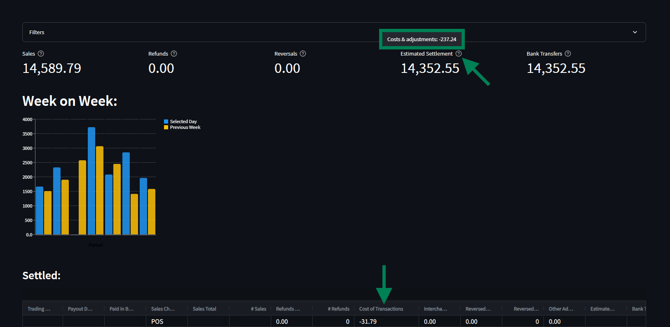
You can also use the Oolio Pay Dashboard to review transaction cost information for the date range selected in the Filters section.
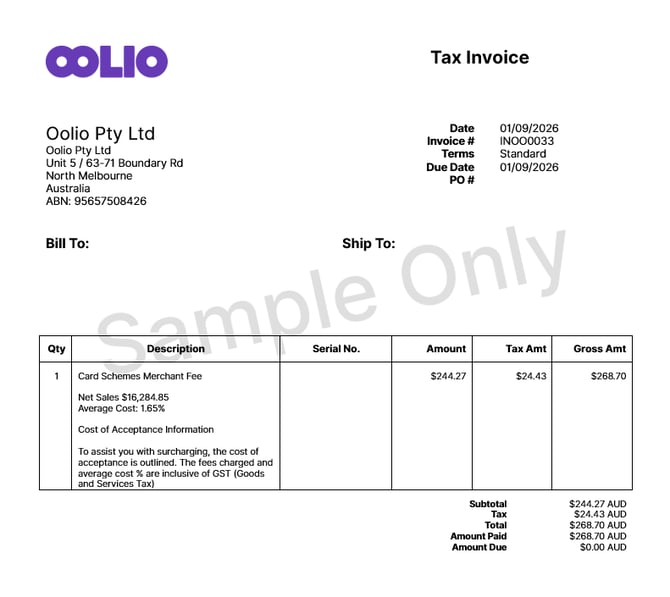
The example above shows how your monthly invoice is presented and how each transaction cost component is broken down.
Viewing Transaction Cost in the Oolio Pay Dashboard
To view the cost for the date shown in the Filters section:
-
Log in and open the Oolio Dashboard.
-
Review the selected date range in Filters.
-
Locate Estimated Settlement.
-
Hover your cursor over the question mark at the end of Estimated Settlement.
-
View the cost amount shown in the tooltip.
This tooltip displays the cost for the selected date range (see image below).
Settled View
In the Settled section of the Dashboard, you can view each settled day individually. Locate the column Cost of Transactions for information relevant to each trading period.
This makes it easier to review daily settled transaction costs for each settlement date.
Additional Resources
Please use the link below to view the Oolio Pay Support article on the Dashboard.
updated to: bepoz v4.9.0.1