
Overview
This article explains how to safely and correctly charge S1F2 and S1E2L EFTPOS devices using the supplied USB-C charging cable. While charging docks are the preferred method where available, some models require USB-C charging as the primary power source.
S1F2 and S1E2L EFTPOS devices supplied with bepoz support USB-C charging as a standard feature.
Charging docks are commonly supplied with S1F2 devices to provide convenience, mobility, and reduced wear in busy hospitality environments. However, USB-C charging is always supported and, in some cases, required.
What’s Included in the Box
Each S1F2 and S1E2L EFTPOS device is supplied with:
-
A USB-C charging cable
-
A region-specific power plug
Important distinctions between models:
-
S1F2 devices are typically supplied with a charging dock, in addition to the USB-C cable
-
S1E2L devices are not supplied with a charging dock and must be charged using the USB-C cable
This is expected behaviour for the S1E2L model and does not indicate missing hardware.
Always use the charging cable and regional power plug provided with the device.
The region-specific power plug is detachable. The supplied charging cable is dual-ended, with USB-C at the device end and USB-A at the power end. This allows for greater flexibility in installations where:
-
General power outlets (GPOs) are limited or difficult to access
-
A high-output USB power source or USB charging hub is used
When using alternative USB power sources, ensure they provide sufficient output to reliably charge the EFTPOS device.
When to Use USB-C Charging
Adyen S1F2
For S1F2 devices, charging docks are the preferred day-to-day charging method. USB-C charging may be required or useful when:
The charging dock has failed, been damaged, or is temporarily unavailable
The terminal is installed in a fixed or constrained environment
A fixed, cabled power solution is mandated by the installation
Adyen S1E2L
S1E2L devices must be charged using the supplied USB-C cable, as these models do not support charging docks.
USB-C charging is the primary and permanent charging method for S1E2L terminals.
This applies across supported deployment scenarios without tying the device to specific POS hardware configurations.
USB-C Port Location
When the EFTPOS device is placed screen-side up and viewed from above, with the card insert reader facing toward you:
-
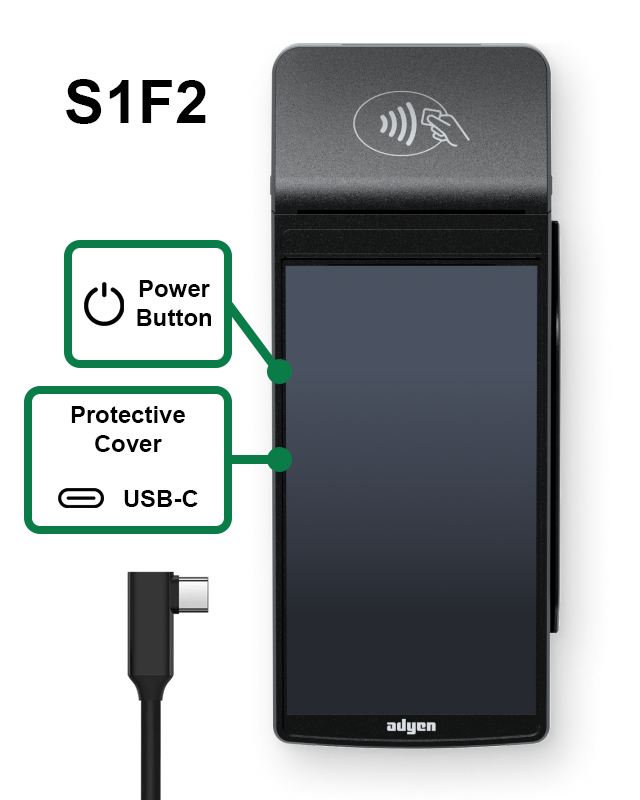
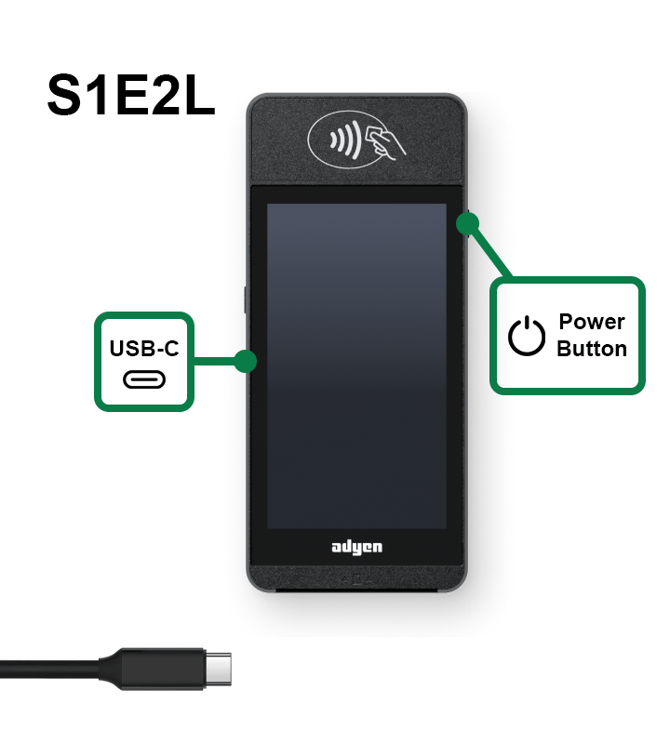
The USB-C charging port is located mid-way on the left-hand side of both the S1F2 and S1E2L devices
-
On S1F2 devices, the USB-C port sits behind a protective rubber cover that also shields additional small ports - the power button is located to the top of the cover
-
On S1E2L devices, the power button is located at the upper end of the right-hand side, nearer to the top corner of the device
The protective cover is designed to reduce dust and debris ingress and should be gently lifted to access the USB-C port. Ensure the cover is reseated after disconnecting the charging cable.
How to Safely Charge Using USB-C
The USB-C charging cable supplied with the S1F2 and S1E2L terminals is compliant with USB industry and UL standards.
Cable type differs by model:
-
S1F2 devices continue to ship with a 90-degree USB-C cable
-
S1E2L devices ship with a straight USB-C cable, introduced to prevent overheating issues observed with angled connectors
To prevent damage to the charging cable or the USB-C port, follow these guidelines:
-
Insert and remove the USB-C cable by holding the connector itself, not the cable
-
Insert and remove the cable straight in and straight out
-
Do not insert or remove the cable at an angle (upward, downward, left, or right)
-
Do not bend, twist, or fold the USB-C cable
-
Do not use excessive force when connecting or disconnecting the cable
-
Always inspect the USB-C port and cable for dust, debris, or foreign objects before use
Improper handling of the USB-C cable can cause damage to both the charging port and the cable, which may affect charging reliability.
Troubleshooting USB-C Charging
If the EFTPOS device is not charging as expected when connected via USB-C:
-
Confirm the supplied USB-C cable and power plug are being used
-
Check that the power point is switched on and providing power
-
Inspect the USB-C cable for visible damage, kinks, or excessive wear
-
Check the USB-C port on the terminal for dust, debris, or foreign objects
-
Disconnect and reconnect the cable, ensuring it is inserted straight and fully seated
-
Test a different power point/high-output USB power source if available
If charging remains intermittent or fails entirely, avoid repeated reconnection attempts and contact bepoz Support.
Environmental Considerations
If the EFTPOS device is used in environments with:
-
High humidity
-
Dust
-
Food or liquid residue
...a charging dock is strongly recommended where possible for S1F2 devices. Docks reduce wear on the USB-C port and provide a more stable and durable charging solution in demanding conditions.
Battery Charging Guidance
These EFTPOS devices are designed to handle regular charging; however, following sensible charging habits can help maintain battery health over time.
General guidance:
-
Continuous connection to power will not damage the device, but is not required once the battery is fully charged
-
Where practical, allow the device to operate on battery power during service periods
-
Reconnect the charger when the battery indicator shows a low charge level
Recommended daily charging pattern:
-
Charge the EFTPOS device overnight or during extended downtime
-
Disconnect from power before active service periods
-
Reconnect to power during the day if the battery level becomes low or between peak service periods
This approach balances operational reliability with long-term battery performance.
For devices supplied with a charging dock (such as S1F2), it is also not necessary for the terminal to remain seated on the dock at all times. While docks provide protection from surface contamination and reduce wear on the USB-C port, removing the device from the dock during service periods is acceptable where operationally practical.
Summary
-
Charging docks are the preferred charging method for S1F2 EFTPOS devices
-
S1E2L devices do not include a charging dock and must be charged via USB-C
-
A USB-C charging cable and power plug are always supplied as standard
-
S1E2L devices ship with straight USB-C cables to prevent overheating issues
-
S1F2 devices continue to ship with 90-degree USB-C cables
-
Always use the supplied charging accessories and follow safe handling guidelines
Correct charging practices help extend the life of your EFTPOS device and reduce the risk of hardware damage.
updated to: bepoz v4.8.2.1