
Overview
This article explains common connection ports that may appear on POS hardware, receipt printers, customer displays, monitors, peripherals, and power equipment used with bepoz.
Connection ports vary between manufacturers, models, and hardware revisions. A device may include only one connection type or several different connection types. Always check the physical device, manufacturer documentation, and supplied cables before connecting or replacing hardware.
Serial Connectors
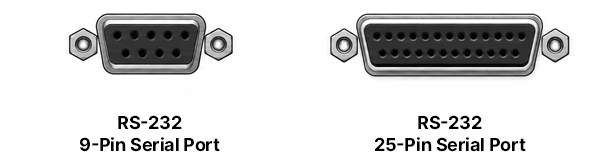
Serial ports are used for direct wired communication between a POS terminal and compatible peripheral hardware, such as receipt printers, docket printers, customer displays, scales, or other supported serial devices.
RS-232 serial communication sends data through a dedicated serial cable. In POS environments, this is commonly used when reliable device-to-device communication is required.
| Connector Type | Description |
|---|---|
| RS-232, 9-Pin Serial | A compact serial connector commonly used on POS terminals and peripheral devices. |
| RS-232, 25-Pin Serial | A larger serial connector found on some legacy or manufacturer-specific hardware. |
Serial devices usually require the correct communication settings, such as the COM port, baud rate, parity, data bits, stop bits, and handshaking. If the cable is connected but these settings do not match, the device may not respond.
For bepoz printer connectivity, Serial is one of the preferred and supported connection methods.
Parallel / LPT Port
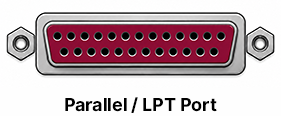
A Parallel or LPT port is a legacy connection type historically used for printers and other peripheral devices.
Parallel ports are wider than serial ports and use multiple pins to transfer data. They are uncommon on modern POS hardware but may still appear on older terminals, printers, or specialised equipment.
Parallel printer connectivity should be treated as legacy hardware. If a device uses a Parallel / LPT connection, confirm compatibility with the manufacturer and avoid assuming it can be substituted with a serial, USB, or network printer connection.
USB Connectors
USB ports are used to connect devices such as printers, scanners, keyboards, mice, customer displays, external storage, and other compatible peripherals to a POS terminal or computer.
| Connector Type | Image | Description |
|---|---|---|
| USB Type-A |  |
A common rectangular USB port often found on terminals, computers, hubs, and peripheral devices. USB Type-A ports may be colour-coded as a general guide: white is commonly associated with USB 1.x, black with USB 2.0, blue with USB 3.x at 5 Gbps, and teal or light blue with newer USB 3.x ports at higher speeds. Red, yellow, orange, purple, green, or other colours are usually manufacturer-specific and may indicate charging, always-on power, or another custom function. Colour coding is not guaranteed, so always confirm the port type using the USB symbol, hardware specifications, or manufacturer documentation. |
| USB Type-B |  |
A square-style USB connector commonly used on printers, EFTPOS docking bases and other peripheral hardware. |
| USB Type-C |  |
A smaller reversible USB connector used on newer devices for data, charging, display output, or power delivery, depending on hardware support. |
| USB Mini-B |  |
A smaller older USB connector used on some legacy peripherals, portable devices, and specialised hardware. |
| USB Micro-B |  |
A compact USB connector commonly found on older mobile devices, external drives, and some peripheral hardware. |
USB connections are usually intended for local device use. A USB-connected device is generally linked to one terminal or computer unless the operating system, driver, or hardware environment has been configured to share it.
⚠️ Important: Although USB ports may be available on some printer models, the preferred and supported printer connection methods for bepoz are Serial or Network.
Ethernet RJ-45
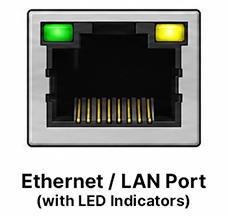
Ethernet ports connect hardware to a local network using a network cable. The physical Ethernet socket commonly used on POS hardware is an RJ-45 port.
In POS environments, Ethernet is commonly used for network printers, terminals, kitchen printers, payment devices, controllers, and other network-capable hardware. A network connection allows supported devices to communicate across the venue network rather than relying on a direct cable to one workstation.
Ethernet devices often rely on network details such as an IP address, subnet, gateway, and communication port. If these details are incorrect, the device may be powered on but unreachable from the POS system.
Some Ethernet ports include indicator lights that show link status or network activity. These lights are not available on every Ethernet port. Some devices may have no visible LEDs, or the indicators may be located elsewhere on the hardware.
For bepoz printer connectivity, Network is one of the preferred and supported connection methods.
RJ-50 Port
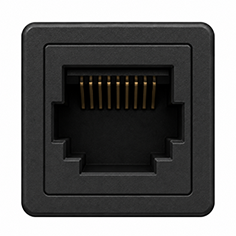
An RJ-50 port is a modular connector that looks similar to other RJ-style sockets but has a different pin arrangement and purpose.
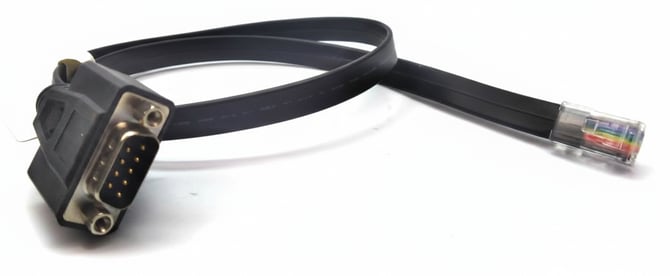
In bepoz environments, RJ-50 ports are commonly associated with printer connectivity when used with an RJ-50-to-Serial converter. This allows the device to communicate with a serial printer through the correct manufacturer-supported adapter or converter cable.
RJ-50 connections should not be treated as standard Ethernet connections. Although the connector may look similar to a network-style port, it is not the same as an RJ-45 Ethernet port and should not be plugged into a network switch or LAN socket unless the manufacturer specifically confirms that the port is designed for that use.
Always use the correct RJ-50-to-Serial converter supplied or approved by the hardware manufacturer. Using an incorrect adapter or cable can result in failed printer communication, incorrect pin mapping, or hardware damage.
Image below is an RJ-50-to-Serial converter cable.
Cash Drawer
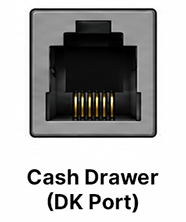
A cash drawer port is commonly labelled as a DK port, meaning Drawer Kick. It is used to connect a cash drawer to a compatible receipt printer or POS device. Other labelings may include DK1, DK2, CD, C/D, CD1, CD2, DRW, Drawer, or Cash Drawer.
This port is not used for normal print communication. Its purpose is to send a drawer release signal when the POS issues the correct command. In many POS setups, the cash drawer connects to the receipt printer, and the printer triggers the drawer to open.
Cash drawer cables can look similar to RJ-11/12 telephone or network cables, but they may be wired differently. Do not substitute a generic cable unless the manufacturer confirms it is suitable for the device.
5V, 12V and 24V DC Power Inputs
DC power inputs provide low-voltage power to hardware such as printers, terminals, displays, and peripheral devices.
| Power Input Type | Image | Description |
|---|---|---|
| 24V DC 3-Pin |  |
A common power input used on many POS receipt and docket printers. |
| 5V / 12V / 24V DC Single-Pin |  |
A round DC input found on some POS-related hardware. In retail and hospitality environments, this style is often seen on EFTPOS terminals and charging cradles, touchscreen devices, powered USB hubs, and docking stations. The required voltage and current rating can vary significantly between devices, so the power supply must match the manufacturer’s specifications. |
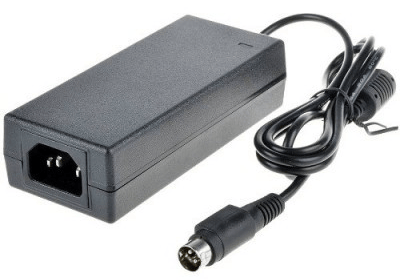
The 24V DC 3-pin input is the more common printer power style. The single-pin 12V / 24V DC input is comparatively rare for printers and should only be used when the device manufacturer specifies it.
These devices will usually require a matching external power supply or inline power converter provided by the manufacturer. Always use the manufacturer-supplied power adapter included with the hardware. An incorrect adapter may have the wrong voltage, polarity, current rating, or connector type, which can cause unstable operation or permanent damage.
Image below shows a typical 24V Power Converter with 3-Pin Plug
PS/2 Legacy Connectors
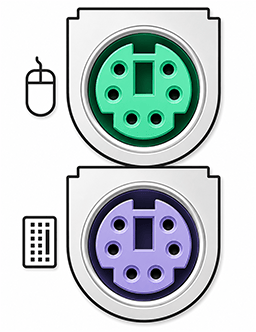
PS/2 ports are legacy round connectors traditionally used for keyboards and mice.
These ports are usually colour-coded, with one port intended for a keyboard (purple) and the other for a mouse (green). They are less common on modern POS terminals and computers but may still appear on older equipment or specialised hardware.
PS/2 devices are generally not hot-swappable. If a PS/2 keyboard or mouse is connected while the terminal is already powered on, the device may not be detected until the terminal is restarted.
Audio and Visual Ports
Audio and visual ports send display signals, sound signals, or combined media output between hardware such as POS terminals, monitors, customer displays, speakers, amplifiers, and external screens.
| Port Type | Image | Description |
|---|---|---|
| 3.5mm Headphone / Audio |  |
A round analogue audio port commonly used for headphones, speakers, or line-out audio. The colour and icon may vary by device, but green is often used for audio output. |
| Composite Audio / Video |  |
Composite audio/video uses round RCA-style connectors. Yellow is commonly used for video, while red (right) and white (left) are commonly used for stereo audio. This is an older analogue connection type and is usually found on legacy display or media equipment. |
| HDMI | 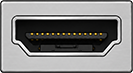 |
HDMI carries digital video and audio through a single cable. It is commonly used for monitors, customer-facing displays, televisions, and other display hardware. |
|
DisplayPort |
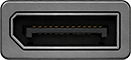 |
DisplayPort is a digital display connector used for monitors and compatible display equipment. It is commonly found on business computers and modern workstations. Some DisplayPort setups support daisy-chaining, where multiple compatible monitors are connected in sequence from one DisplayPort output using DisplayPort Multi-Stream Transport. This requires compatible hardware, suitable DisplayPort cables, and monitor support for DisplayPort output or MST. Not all DisplayPort ports, adapters, docks, or monitors support daisy-chaining, so confirm the device specifications before planning a multi-screen setup. |
| Dual-Link DVI-D |  |
Dual-Link DVI-D is a digital video connection used for monitors and display hardware. DVI-D carries video only and does not carry audio. |
| VGA |  |
VGA is an older analogue video connector. It is commonly identified by its 15-pin layout and is used for video only. VGA does not carry audio. Some POS hardware may include powered VGA ports designed to supply power to compatible customer displays. As a general guide, blue VGA ports and blue VGA cables are usually standard non-powered VGA. Black VGA ports or manufacturer-labelled VGA ports may indicate powered VGA on some POS systems. Colour is not a guarantee, so always check the hardware manual before connecting a VGA display. Connecting a standard VGA monitor or cable to a powered VGA port may damage the display, POS terminal, or cable. |
| S-Video |  |
S-Video is a legacy analogue video connection used on older display and media equipment. It carries video only and does not carry audio. |
| TOSLINK Optical |  |
TOSLINK optical is a digital audio connection that uses optical light transmission. It is used for compatible audio equipment and does not carry video. |
When connecting display hardware, confirm that the cable type matches both the source device and the display. Some connectors may look similar but are not interchangeable.
AC Power Plug Connections
AC power plug connections supply mains power to power packs, terminals, monitors, printers, and other electrical hardware.
| Plug Type | Image | Description |
|---|---|---|
| IEC C6 |  |
IEC C6 is commonly associated with compact power supplies and uses a three-pin cloverleaf-style connection. It is often referred to as the 'Mickey Mouse' plug. |
| IEC C7 | 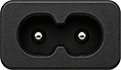 |
IEC C7 is commonly associated with figure-eight style power leads and is often used on smaller power supplies or electronic devices. |
| IEC C14 | 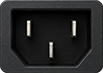 |
IEC C14 is a common three-pin mains inlet used on many desktop computers, monitors, power supplies, and larger hardware devices. |
Always use the correct mains lead for the device and region. The power cable should fit securely, show no signs of damage, and be connected to a safe working outlet. Do not force a cable into a power inlet that does not match the connector shape.
eSATA and eSATAp Connections
eSATA and eSATAp connections are used for external storage devices, such as external hard drives or backup drives. They are less common on modern POS hardware but may appear on older terminals, business PCs, or specialised equipment.
Image below is an eSATAp Port.

| Connector Type | Description |
|---|---|
| eSATA | External Serial ATA. This connection is used for data transfer to compatible external storage devices. Standard eSATA does not provide power to the connected device, so the external drive usually requires its own power supply. |
| eSATAp | Powered eSATA. This combines eSATA data connectivity with power in a single port on supported hardware. Some eSATAp ports may also support USB-style device connection, depending on the manufacturer and port design. |
eSATA and eSATAp ports should only be used with compatible devices and cables. Do not force USB, SATA, or other connectors into the port. For eSATAp, confirm the supported power output before connecting external storage, as power availability can vary between devices and manufacturers.
Jack Screws
Jack screws are small threaded retaining posts located on either side of some hardware ports. They allow compatible cable screws to be tightened into place, helping keep the connection secure and reducing the chance of the cable being pulled loose.
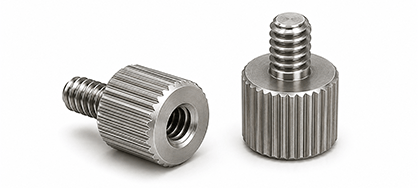
Jack screws are generally found with ports that use larger multi-pin connectors, including:
| Port Type | Common Use |
|---|---|
| Serial / RS-232 | Used for direct communication with compatible POS peripherals, printers, customer displays, scales, and other serial devices. |
| Parallel / LPT | A legacy printer and peripheral connection commonly found on older hardware. |
| VGA | An analogue video connection commonly used with monitors and customer displays. |
| DVI | A digital video connection used with compatible monitors and display hardware. |
| External SCSI | A legacy connection sometimes found on older storage, backup, or controller hardware. |
| DA-15 / Game-Style Port | A legacy 15-pin connector occasionally found on older sound cards, industrial terminals, or specialised POS hardware. |
| Proprietary Customer Display Connectors | Some POS terminals use manufacturer-specific multi-pin display connectors with jack screws to secure pole displays or customer-facing screens. |
Not every port includes jack screws, even if the connector type normally supports them. Some compact or manufacturer-specific hardware may use a different locking method or no retaining hardware at all.
updated to: bepoz v4.9.0.2