
Overview
This article explains the public-facing workflow for the WYMAC Kiosk and Colossus integration with bepoz.
The integration allows WYMAC to exchange member, loyalty, account, reward, and promotion information with bepoz through an approved API workflow.
The WYMAC Kiosk is primarily a customer loyalty and engagement kiosk. It allows customers to identify themselves, review their membership information, interact with rewards and promotions, play available games, and complete other approved member activities.
WYMAC Colossus supports promotional activity that can interact with member accounts and transactions through the integrated bepoz workflow.
📌 Note: This article does not include setup, configuration, credentials, network details, licensing, or internal support procedures.
Before You Begin
The WYMAC integration must already be enabled and active before the workflows in this article apply.
Ensure:
- WYMAC Kiosk or WYMAC Colossus has been approved for use at the venue.
- The integration has been implemented by authorised support teams.
- Venue staff understand the loyalty and promotional functions available to customers.
- Member accounts, rewards, promotions, and loyalty rules are managed according to the venue’s normal operating procedures.
WYMAC Kiosk Workflow
The WYMAC Kiosk provides customers with access to their loyalty account and available member activities.
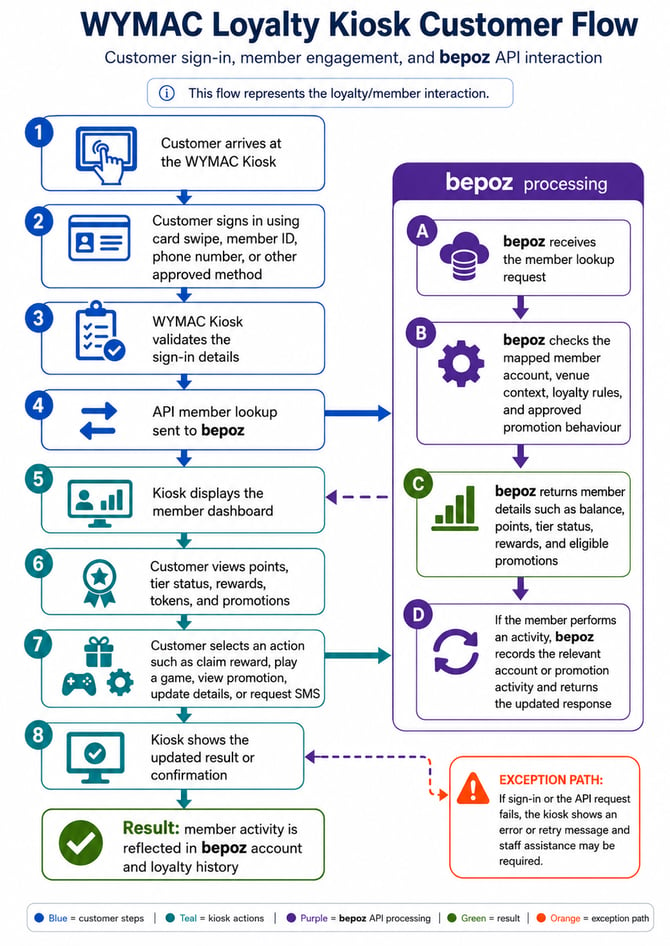
The typical customer workflow is:
- The customer approaches the WYMAC Kiosk.
- The customer signs in using an available identification method, such as a membership card swipe, member ID, phone number, or another approved method.
- WYMAC validates the information entered or presented by the customer.
- WYMAC sends a member lookup request to bepoz through the approved API integration.
- bepoz identifies the mapped member account and applies the relevant venue, account, loyalty, reward, and promotion rules.
- bepoz returns the available member information to WYMAC.
- The kiosk displays the customer’s member dashboard.
Depending on the venue’s approved WYMAC functionality, the dashboard may display information such as:
- Member name
- Account or member balance
- Loyalty points
- Membership tier or status
- Available rewards
- Reward progress
- Promotional offers
- Game or activity tokens
- Eligible member activities
The customer may then select an available action, such as:
- Claiming an eligible reward
- Viewing a promotion
- Playing an available game
- Entering an approved prize draw
- Viewing loyalty progress
- Updating permitted member details
- Requesting an SMS or other available member communication
Where the selected activity requires account or promotion processing:
- WYMAC sends the relevant activity request to bepoz.
- bepoz checks the member account and applicable loyalty or promotion rules.
- bepoz records the relevant account, reward, or promotional activity where applicable.
- bepoz returns an updated response to WYMAC.
- The kiosk displays the outcome or confirmation to the customer.
The customer-facing result is an interactive loyalty experience in which the customer can review and use eligible membership benefits, with applicable activity reflected in bepoz.
WYMAC Colossus Promotion Workflow
WYMAC Colossus supports promotional experiences that interact with bepoz member, account, and transaction information.
The typical workflow is:
- A customer engages with a WYMAC Colossus promotion.
- WYMAC identifies the customer or relevant promotional context where required.
- WYMAC checks whether the promotion may apply.
- WYMAC sends the relevant member or promotion request through the approved integration.
- bepoz applies the mapped account, loyalty, pricing, discount, reward, or promotion behaviour approved for the venue.
- The result is returned to WYMAC.
- The customer receives the applicable promotional outcome.
- Relevant account, reward, promotion, or transaction activity is recorded in bepoz where applicable.
The customer-facing result is that eligible promotional activity can be recognised through WYMAC and reflected in the integrated bepoz workflow.
Information Flow
The WYMAC API workflow may use approved integration data to support member identification, loyalty activity, rewards, games, promotions, and related account handling.
| Information type | Purpose |
|---|---|
| Member identification | Allows WYMAC to request the correct customer account from bepoz |
| Venue context | Ensures member and promotion activity is processed against the correct operating location |
| Account context | Supports mapped member, loyalty, balance, and account behaviour |
| Loyalty information | Returns points, tier status, progress, or other approved member information |
| Reward information | Identifies available, claimed, or redeemed member rewards |
| Promotion details | Supports eligible offers and promotional activity |
| Game or activity information | Supports approved games, prize draws, tokens, or customer engagement features |
| Member activity request | Sends a selected kiosk activity to bepoz where processing is required |
| API response | Confirms the outcome and returns updated information to the kiosk |
Expected Behaviour
When the integration is operating correctly:
- Customers can identify themselves at the WYMAC Kiosk.
- The kiosk displays the appropriate member dashboard and available activities.
- Loyalty points, balances, tier status, rewards, and promotions are returned according to the approved account configuration.
- Eligible customer activities can be submitted through the integration.
- Reward and promotion behaviour follows the venue’s approved rules.
- Customer-facing outcomes are returned through WYMAC.
- Relevant member, account, reward, promotion, or transaction activity remains available in bepoz where applicable.
- WYMAC Colossus promotions follow the approved promotional workflow.
The exact information and activities shown on the kiosk may vary according to the venue’s WYMAC configuration and loyalty program.
Unsuccessful Sign-In or API Response
If the kiosk cannot identify the member or complete an API request, the customer may receive an error, retry, or assistance message.
This can occur when:
- The membership card or identifier cannot be recognised.
- The member details entered do not match an available account.
- The requested reward or promotion is no longer eligible.
- The kiosk cannot receive a response from bepoz.
- The WYMAC integration is temporarily unavailable.
The customer may need to retry the action or request assistance from venue staff.
When to Contact Support
Contact your authorised support contact if:
- Customers cannot sign in at the WYMAC Kiosk.
- Valid member accounts are not being recognised.
- Member balances, points, tiers, or rewards appear incorrect.
- Available rewards or promotions are not displayed as expected.
- Games or other approved member activities do not return the expected result.
- Claimed rewards or promotional activity are not reflected in bepoz.
- The customer receives an unexpected response from the WYMAC interface.
- Activity appears against the wrong venue or account.
- The integration appears unavailable.
When raising a support request, include:
- Venue name
- Date and time of the issue
- WYMAC channel used, such as WYMAC Kiosk or WYMAC Colossus
- The sign-in method used
- Customer-facing error message, if shown
- Member or account details permitted under the venue’s support and privacy procedures
- Reward, game, promotion, or activity selected
- Whether the issue affects one member, one activity, or all WYMAC activity
Further Reading for Internal Use Only
For bepoz Implementation and Support Teams, please use the link below for the Interface Setup steps and requirements.
updated to: bepoz v4.9.0.4